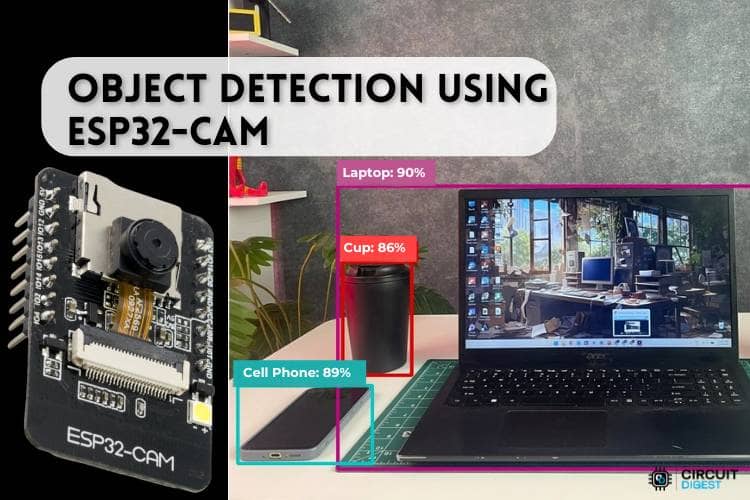
ระบบตรวจจับวัตถุแบบเรียลไทม์ด้วยกล้อง ESP32-CAM และ CircuitDigest Cloud
สวัสดีชาว Maker และสาย AI ทุกคนครับ! 💡 ถ้าพูดถึงการทำระบบตรวจจับวัตถุ (Object Detection) หลายคนคงนึกถึงการเทรนโมเดล AI ที่แสนจะยุ่งยาก ต้องหา Dataset มานั่งตีกรอบ (Bounding Box) และต้องใช้บอร์ดคอมพิวเตอร์แรงๆ ใช่ไหมครับ?
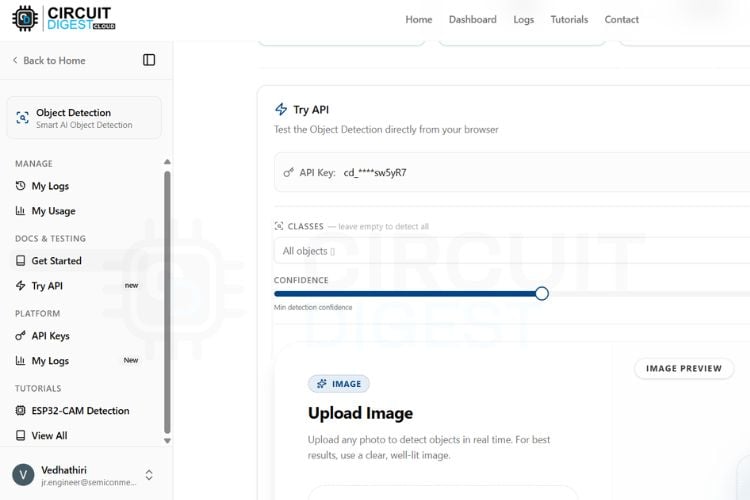
แต่วันนี้เราจะพาคุณไปทางลัด! ด้วยการใช้โมดูลกล้องจิ๋วยอดฮิตอย่าง ESP32-CAM ร่วมกับ CircuitDigest Cloud API ที่จะเปลี่ยนภาพถ่ายให้กลายเป็นผลลัพธ์การตรวจจับวัตถุพร้อมค่าความแม่นยำ (Confidence) ส่งกลับมาที่ Serial Monitor ได้ทันที โดยไม่ต้องเทรนโมเดลเอง ไม่ต้องใช้ Edge Impulse และไม่ต้องมี Dataset!
Object Detection คืออะไร? 🤔
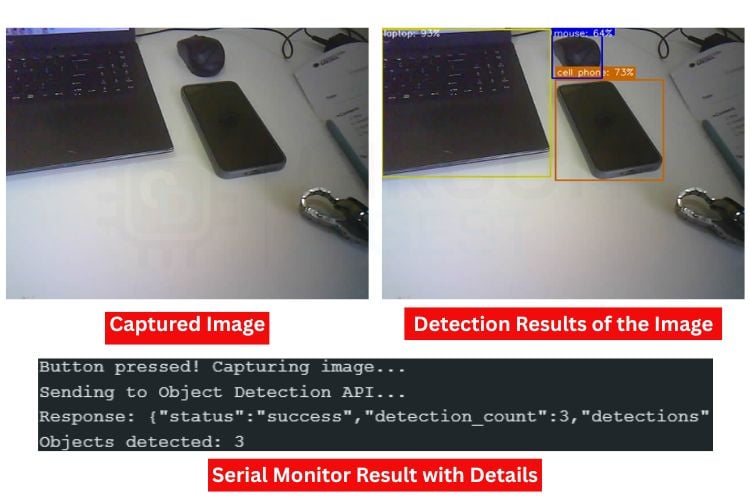
มันคือเทคนิคด้าน Computer Vision ที่คอมพิวเตอร์สามารถระบุได้ว่าในภาพนั้นมีวัตถุอะไรอยู่บ้าง (เช่น โทรศัพท์, แก้วน้ำ, รถยนต์, สุนัข) โดยระบบจะวาดกรอบสี่เหลี่ยมล้อมรอบวัตถุพร้อมระบุเปอร์เซ็นต์ความมั่นใจ สมัยก่อนเทคนิคนี้กินทรัพยากรสูงมาก แต่ด้วยพลังของ Cloud API เราจึงสามารถจับมันยัดลงบอร์ดไมโครคอนโทรลเลอร์ตัวเล็กๆ ได้สบายครับ
ระบบนี้ทำงานยังไง? ⚙️
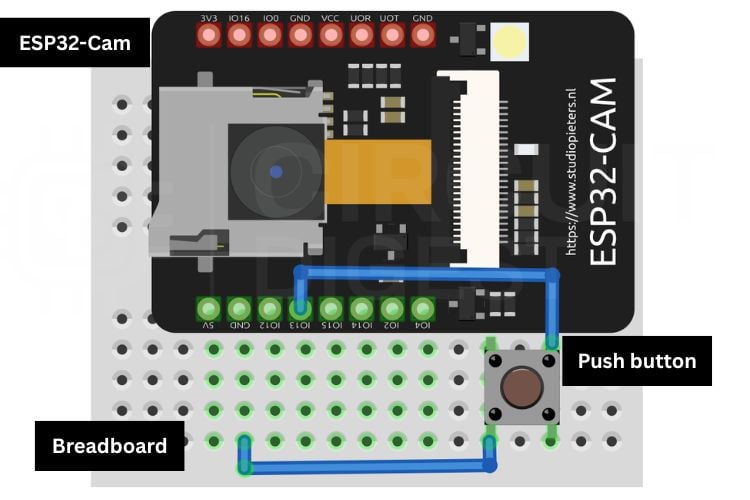
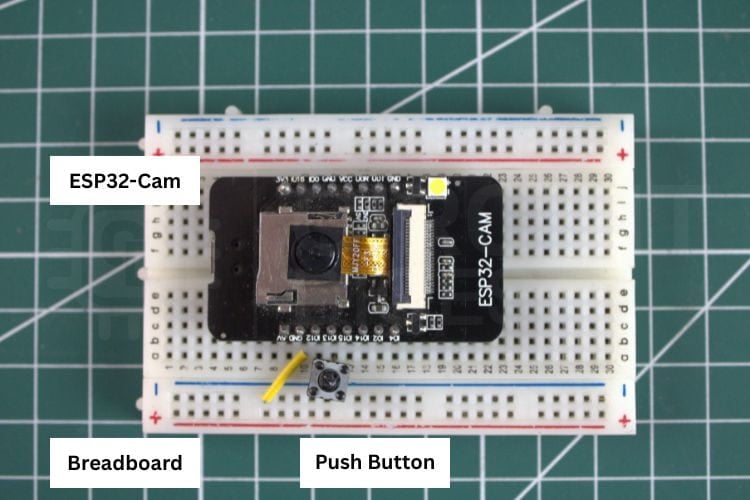
- เมื่อเรากด Push Button บอร์ด ESP32-CAM จะทำการถ่ายภาพ
- ส่งภาพนั้นผ่านอินเทอร์เน็ต (Wi-Fi) ไปยังเซิร์ฟเวอร์ของ CircuitDigest Cloud
- เซิร์ฟเวอร์จะประมวลผลด้วย AI Object Detection (รองรับกว่า 75+ คลาส)
- ส่งผลลัพธ์กลับมาในรูปแบบข้อความ (เช่น พบมือถือ 1 เครื่อง, ความแม่นยำ 95%) และแสดงผลผ่าน Serial Monitor ของ Arduino IDE ทันที!
💡 Maker's Tip สำหรับมือใหม่: บอร์ด ESP32-CAM รุ่นมาตรฐานจะไม่มีพอร์ต USB ในตัวนะครับ คุณจะต้องใช้ FTDI Adapter (USB-to-Serial) ในการอัปโหลดโค้ด (อย่าลืมจั๊มพิน GPIO0 ลง GND ตอนอัปโหลดด้วยล่ะ!)
หากเพื่อนๆ กำลังมองหา บอร์ด ESP32-CAM, FTDI Adapter, ปุ่มกด (Push Button) หรือสายจัมเปอร์ แวะมาช้อปของแท้คุณภาพดีได้ที่ Globalbyte เลยครับ! ของครบพร้อมทำโปรเจกต์ทันที
เจาะลึกโค้ดการทำงาน (Code Explanation) 💻
ตัวโค้ดที่ระบบสร้างให้จะทำงานร่วมกับไลบรารี esp_camera.h โดยมีหัวใจหลักคือการสร้าง MJPEG Live Preview ให้เราส่องกล้องผ่าน Web Browser ก่อนถ่าย และเมื่อกดปุ่ม ระบบจะแพ็กภาพแบบ Multipart Form-Data ส่ง HTTPS POST Request ไปยัง API ของเซิร์ฟเวอร์ครับ
ในโค้ดมีการใช้เทคนิค Semaphore (Mutex) ด้วย เพื่อป้องกันไม่ให้การสตรีมภาพ (Core 0) ไปตีกับการส่งภาพขึ้น Cloud (Core 1) ทำให้ระบบไม่แครชครับ
ปัญหาพบบ่อยและการแก้ไข (Troubleshooting) 🛠️
-
ESP32-CAM รีสตาร์ทเองบ่อย (Brownout): เกิดจากไฟเลี้ยงไม่พอครับ ตอนต่อ Wi-Fi และใช้กล้อง บอร์ดอาจดึงกระแสไฟทะลุ 500mA ควรใช้แหล่งจ่ายไฟ 5V/1A แบบแยก หรือเปลี่ยนสาย USB ให้สั้นและคุณภาพดีขึ้น
-
ภาพเบลอ ตรวจจับไม่เจอ: เลนส์ของ ESP32-CAM หมุนปรับโฟกัสด้วยมือได้นะครับ ให้ลองหมุนช้าๆ จนภาพชัด และควรใช้งานในที่แสงสว่างเพียงพอ
-
Camera init failed: เช็คว่าเลือกโมเดลกล้องเป็น
AI Thinker ESP32-CAM ใน Arduino IDE หรือยัง และสายไฟต่างๆ แน่นดีไหม
⚠️ อยากรู้ลึกกว่านี้? ขอเชียร์ให้ตามไปอ่านต้นฉบับเลย!
เนื่องจากการตั้งค่า API บนหน้าเว็บคลาวด์ การจัดการบอร์ดใน Arduino IDE และการแก้ปัญหาเฉพาะหน้า (Troubleshooting) มีรายละเอียดเชิงลึกค่อนข้างเยอะ เพื่อให้เพื่อนๆ ทำตามได้ง่ายและไม่พลาดสเต็ปสำคัญ เราขอแนะนำให้เข้าไปศึกษาขั้นตอนแบบเจาะลึก Step-by-Step จากบทความต้นฉบับ ครับ!
👉 คลิกอ่านคู่มือฉบับเต็มบน CircuitDigest ได้ที่นี่
#include <Arduino.h>
#include <WiFi.h>
#include <WiFiClientSecure.h>
#include "esp_camera.h"
#include <WebServer.h>

const char* ssid       = "yourssidname";
const char* password   = "yourwifipassword";
const char* serverName = "www.circuitdigest.cloud";
const char* serverPath = "/api/v1/object-detection/detect";
const int   serverPort = 443;
const char* apiKey     = "yourapikey";
const char* classes    = "[]";
const char* confidence = "0.2";

#define TRIGGER_BTN 13
unsigned long lastTriggerTime = 0;
const unsigned long debounceDelay = 500;

#define PWDN_GPIO_NUM   32
#define RESET_GPIO_NUM  -1
#define XCLK_GPIO_NUM    0
#define SIOD_GPIO_NUM   26
#define SIOC_GPIO_NUM   27
#define Y9_GPIO_NUM     35
#define Y8_GPIO_NUM     34
#define Y7_GPIO_NUM     39
#define Y6_GPIO_NUM     36
#define Y5_GPIO_NUM     21
#define Y4_GPIO_NUM     19
#define Y3_GPIO_NUM     18
#define Y2_GPIO_NUM      5
#define VSYNC_GPIO_NUM  25
#define HREF_GPIO_NUM   23
#define PCLK_GPIO_NUM   22

WiFiClientSecure client;
WebServer previewServer(80);

// ── Thread-safe camera lock ────────────────────────────────────────────────
SemaphoreHandle_t camMutex = NULL;
inline bool lockCam(TickType_t wait = portMAX_DELAY) {
 return xSemaphoreTake(camMutex, wait) == pdTRUE;
}
inline void unlockCam() { xSemaphoreGive(camMutex); }

// ── Camera init ───────────────────────────────────────────────────────────
void initCamera() {
 camera_config_t config;
 config.ledc_channel = LEDC_CHANNEL_0;
 config.ledc_timer   = LEDC_TIMER_0;
 config.pin_d0 = Y2_GPIO_NUM; config.pin_d1 = Y3_GPIO_NUM;
 config.pin_d2 = Y4_GPIO_NUM; config.pin_d3 = Y5_GPIO_NUM;
 config.pin_d4 = Y6_GPIO_NUM; config.pin_d5 = Y7_GPIO_NUM;
 config.pin_d6 = Y8_GPIO_NUM; config.pin_d7 = Y9_GPIO_NUM;
 config.pin_xclk     = XCLK_GPIO_NUM;
 config.pin_pclk     = PCLK_GPIO_NUM;
 config.pin_vsync    = VSYNC_GPIO_NUM;
 config.pin_href     = HREF_GPIO_NUM;
 config.pin_sscb_sda = SIOD_GPIO_NUM;
 config.pin_sscb_scl = SIOC_GPIO_NUM;
 config.pin_pwdn     = PWDN_GPIO_NUM;
 config.pin_reset    = RESET_GPIO_NUM;
 config.xclk_freq_hz = 20000000;
 config.pixel_format = PIXFORMAT_JPEG;
 config.frame_size   = FRAMESIZE_SVGA;
 config.jpeg_quality = 8;
 config.fb_count     = 2;

 esp_err_t err = esp_camera_init(&config);
 if (err != ESP_OK) {
   Serial.printf("Camera init failed: 0x%x\n", err);
   return;
 }

 sensor_t* s = esp_camera_sensor_get();
 s->set_brightness(s, 1);
 s->set_contrast(s, 2);
 s->set_saturation(s, 0);
 s->set_whitebal(s, 1);
 s->set_exposure_ctrl(s, 1);
 s->set_gain_ctrl(s, 1);
 s->set_aec2(s, 1);
 s->set_ae_level(s, 1);
 Serial.println("Camera initialized.");
}

// ── Root page (with auto-refresh fallback JS) ─────────────────────────────
void handleRoot() {
 previewServer.send(200, "text/html",
   ""
   ""
   "
"
""
""
"
Camera Preview
"
"
Press the button to detect objects
"
"![]() "
""
);
}
// ── MJPEG stream handler ──────────────────────────────────────────────────
void handleStream() {
WiFiClient streamClient = previewServer.client();
streamClient.println("HTTP/1.1 200 OK");
streamClient.println("Content-Type: multipart/x-mixed-replace; boundary=frame");
streamClient.println("Cache-Control: no-cache");
streamClient.println("Connection: close");
streamClient.println();
const TickType_t lockWait = pdMS_TO_TICKS(200);
const uint32_t frameGap = 50;
const uint32_t yieldGap = 80;
const uint32_t watchdog = 8000;
uint32_t lastFrame = millis();
while (streamClient.connected()) {
if (millis() - lastFrame > watchdog) {
Serial.println("[stream] watchdog timeout, dropping client");
break;
}
if (!lockCam(lockWait)) {
vTaskDelay(pdMS_TO_TICKS(yieldGap));
continue;
}
camera_fb_t* discard = esp_camera_fb_get();
if (discard) esp_camera_fb_return(discard);
camera_fb_t* fb = esp_camera_fb_get();
unlockCam();
if (!fb) {
vTaskDelay(pdMS_TO_TICKS(10));
continue;
}
streamClient.print("--frame\r\nContent-Type: image/jpeg\r\nContent-Length: ");
streamClient.print(fb->len);
streamClient.print("\r\n\r\n");
size_t written = streamClient.write(fb->buf, fb->len);
streamClient.print("\r\n");
esp_camera_fb_return(fb);
if (written == 0) {
Serial.println("[stream] write failed, dropping client");
break;
}
lastFrame = millis();
vTaskDelay(pdMS_TO_TICKS(frameGap));
}
streamClient.stop();
Serial.println("[stream] client disconnected");
}
// ── Web server task (Core 0) ──────────────────────────────────────────────
void webServerTask(void* param) {
while (true) {
previewServer.handleClient();
vTaskDelay(1);
}
}
// ── API call ──────────────────────────────────────────────────────────────
String sendImageToAPI(camera_fb_t* fb) {
if (!client.connect(serverName, serverPort)) {
return "Connection failed";
}
String boundary = "----ESP32Boundary";
String head = "--" + boundary + "\r\n"
"Content-Disposition: form-data; name=\"imageFile\"; filename=\"photo.jpg\"\r\n"
"Content-Type: image/jpeg\r\n\r\n";
String classesPart = "\r\n--" + boundary + "\r\n"
"Content-Disposition: form-data; name=\"classes\"\r\n\r\n"
+ String(classes) + "\r\n";
String confPart = "--" + boundary + "\r\n"
"Content-Disposition: form-data; name=\"confidence\"\r\n\r\n"
+ String(confidence) + "\r\n";
String tail = "--" + boundary + "--\r\n";
int contentLen = head.length() + fb->len
+ classesPart.length() + confPart.length() + tail.length();
client.println("POST " + String(serverPath) + " HTTP/1.1");
client.println("Host: " + String(serverName));
client.println("X-API-Key: " + String(apiKey));
client.println("Content-Type: multipart/form-data; boundary=" + boundary);
client.println("Content-Length: " + String(contentLen));
client.println("Connection: close");
client.println();
client.print(head);
client.write(fb->buf, fb->len);
client.print(classesPart);
client.print(confPart);
client.print(tail);
uint32_t timeout = millis();
while (client.available() == 0) {
if (millis() - timeout > 15000) {
client.stop();
return "Timeout";
}
delay(10);
}
String response = "";
while (client.available()) {
response += (char)client.read();
}
client.stop();
int jsonStart = response.indexOf("\r\n\r\n");
return (jsonStart != -1) ? response.substring(jsonStart + 4) : response;
}
// ── Setup ─────────────────────────────────────────────────────────────────
void setup() {
Serial.begin(115200);
pinMode(TRIGGER_BTN, INPUT_PULLUP);
camMutex = xSemaphoreCreateMutex();
initCamera();
WiFi.begin(ssid, password);
Serial.print("Connecting to WiFi");
while (WiFi.status() != WL_CONNECTED) {
delay(500);
Serial.print(".");
}
Serial.println("\nWiFi connected: " + WiFi.localIP().toString());
Serial.println("Preview: http://" + WiFi.localIP().toString());
client.setInsecure();
previewServer.on("/", handleRoot);
previewServer.on("/stream", handleStream);
previewServer.begin();
xTaskCreatePinnedToCore(webServerTask, "webTask", 8192, NULL, 1, NULL, 0);
}
// ── Main loop (Core 1) ────────────────────────────────────────────────────
void loop() {
if (digitalRead(TRIGGER_BTN) != LOW) return;
uint32_t now = millis();
if (now - lastTriggerTime < debounceDelay) return;
lastTriggerTime = now;
Serial.println("Button pressed — capturing...");
if (WiFi.status() != WL_CONNECTED) {
Serial.println("WiFi lost, reconnecting...");
WiFi.begin(ssid, password);
for (int i = 0; i < 20 && WiFi.status() != WL_CONNECTED; i++) {
delay(500); Serial.print(".");
}
if (WiFi.status() != WL_CONNECTED) {
Serial.println("Reconnect failed!");
return;
}
Serial.println("WiFi back.");
}
if (!lockCam(pdMS_TO_TICKS(3000))) {
Serial.println("Could not lock camera — try again");
return;
}
sensor_t* s = esp_camera_sensor_get();
s->set_framesize(s, FRAMESIZE_VGA);
s->set_quality(s, 10);
delay(150);
camera_fb_t* warmup = esp_camera_fb_get();
if (warmup) esp_camera_fb_return(warmup);
delay(80);
camera_fb_t* fb = esp_camera_fb_get();
if (!fb) {
Serial.println("Capture failed");
s->set_framesize(s, FRAMESIZE_SVGA);
s->set_quality(s, 8);
unlockCam();
return;
}
Serial.printf("Captured %u bytes — sending to API...\n", fb->len);
String result = sendImageToAPI(fb);
esp_camera_fb_return(fb);
s->set_framesize(s, FRAMESIZE_SVGA);
s->set_quality(s, 8);
unlockCam();
Serial.println("Response: " + result);
int idx = result.indexOf("\"detection_count\":");
if (idx != -1) {
int start = result.indexOf(':', idx) + 1;
int end = result.indexOf(',', start);
String count = result.substring(start, end);
count.trim();
Serial.println("Objects detected: " + count);
} else {
Serial.println("No detection data in response.");
}
}
"
""
);
}
// ── MJPEG stream handler ──────────────────────────────────────────────────
void handleStream() {
WiFiClient streamClient = previewServer.client();
streamClient.println("HTTP/1.1 200 OK");
streamClient.println("Content-Type: multipart/x-mixed-replace; boundary=frame");
streamClient.println("Cache-Control: no-cache");
streamClient.println("Connection: close");
streamClient.println();
const TickType_t lockWait = pdMS_TO_TICKS(200);
const uint32_t frameGap = 50;
const uint32_t yieldGap = 80;
const uint32_t watchdog = 8000;
uint32_t lastFrame = millis();
while (streamClient.connected()) {
if (millis() - lastFrame > watchdog) {
Serial.println("[stream] watchdog timeout, dropping client");
break;
}
if (!lockCam(lockWait)) {
vTaskDelay(pdMS_TO_TICKS(yieldGap));
continue;
}
camera_fb_t* discard = esp_camera_fb_get();
if (discard) esp_camera_fb_return(discard);
camera_fb_t* fb = esp_camera_fb_get();
unlockCam();
if (!fb) {
vTaskDelay(pdMS_TO_TICKS(10));
continue;
}
streamClient.print("--frame\r\nContent-Type: image/jpeg\r\nContent-Length: ");
streamClient.print(fb->len);
streamClient.print("\r\n\r\n");
size_t written = streamClient.write(fb->buf, fb->len);
streamClient.print("\r\n");
esp_camera_fb_return(fb);
if (written == 0) {
Serial.println("[stream] write failed, dropping client");
break;
}
lastFrame = millis();
vTaskDelay(pdMS_TO_TICKS(frameGap));
}
streamClient.stop();
Serial.println("[stream] client disconnected");
}
// ── Web server task (Core 0) ──────────────────────────────────────────────
void webServerTask(void* param) {
while (true) {
previewServer.handleClient();
vTaskDelay(1);
}
}
// ── API call ──────────────────────────────────────────────────────────────
String sendImageToAPI(camera_fb_t* fb) {
if (!client.connect(serverName, serverPort)) {
return "Connection failed";
}
String boundary = "----ESP32Boundary";
String head = "--" + boundary + "\r\n"
"Content-Disposition: form-data; name=\"imageFile\"; filename=\"photo.jpg\"\r\n"
"Content-Type: image/jpeg\r\n\r\n";
String classesPart = "\r\n--" + boundary + "\r\n"
"Content-Disposition: form-data; name=\"classes\"\r\n\r\n"
+ String(classes) + "\r\n";
String confPart = "--" + boundary + "\r\n"
"Content-Disposition: form-data; name=\"confidence\"\r\n\r\n"
+ String(confidence) + "\r\n";
String tail = "--" + boundary + "--\r\n";
int contentLen = head.length() + fb->len
+ classesPart.length() + confPart.length() + tail.length();
client.println("POST " + String(serverPath) + " HTTP/1.1");
client.println("Host: " + String(serverName));
client.println("X-API-Key: " + String(apiKey));
client.println("Content-Type: multipart/form-data; boundary=" + boundary);
client.println("Content-Length: " + String(contentLen));
client.println("Connection: close");
client.println();
client.print(head);
client.write(fb->buf, fb->len);
client.print(classesPart);
client.print(confPart);
client.print(tail);
uint32_t timeout = millis();
while (client.available() == 0) {
if (millis() - timeout > 15000) {
client.stop();
return "Timeout";
}
delay(10);
}
String response = "";
while (client.available()) {
response += (char)client.read();
}
client.stop();
int jsonStart = response.indexOf("\r\n\r\n");
return (jsonStart != -1) ? response.substring(jsonStart + 4) : response;
}
// ── Setup ─────────────────────────────────────────────────────────────────
void setup() {
Serial.begin(115200);
pinMode(TRIGGER_BTN, INPUT_PULLUP);
camMutex = xSemaphoreCreateMutex();
initCamera();
WiFi.begin(ssid, password);
Serial.print("Connecting to WiFi");
while (WiFi.status() != WL_CONNECTED) {
delay(500);
Serial.print(".");
}
Serial.println("\nWiFi connected: " + WiFi.localIP().toString());
Serial.println("Preview: http://" + WiFi.localIP().toString());
client.setInsecure();
previewServer.on("/", handleRoot);
previewServer.on("/stream", handleStream);
previewServer.begin();
xTaskCreatePinnedToCore(webServerTask, "webTask", 8192, NULL, 1, NULL, 0);
}
// ── Main loop (Core 1) ────────────────────────────────────────────────────
void loop() {
if (digitalRead(TRIGGER_BTN) != LOW) return;
uint32_t now = millis();
if (now - lastTriggerTime < debounceDelay) return;
lastTriggerTime = now;
Serial.println("Button pressed — capturing...");
if (WiFi.status() != WL_CONNECTED) {
Serial.println("WiFi lost, reconnecting...");
WiFi.begin(ssid, password);
for (int i = 0; i < 20 && WiFi.status() != WL_CONNECTED; i++) {
delay(500); Serial.print(".");
}
if (WiFi.status() != WL_CONNECTED) {
Serial.println("Reconnect failed!");
return;
}
Serial.println("WiFi back.");
}
if (!lockCam(pdMS_TO_TICKS(3000))) {
Serial.println("Could not lock camera — try again");
return;
}
sensor_t* s = esp_camera_sensor_get();
s->set_framesize(s, FRAMESIZE_VGA);
s->set_quality(s, 10);
delay(150);
camera_fb_t* warmup = esp_camera_fb_get();
if (warmup) esp_camera_fb_return(warmup);
delay(80);
camera_fb_t* fb = esp_camera_fb_get();
if (!fb) {
Serial.println("Capture failed");
s->set_framesize(s, FRAMESIZE_SVGA);
s->set_quality(s, 8);
unlockCam();
return;
}
Serial.printf("Captured %u bytes — sending to API...\n", fb->len);
String result = sendImageToAPI(fb);
esp_camera_fb_return(fb);
s->set_framesize(s, FRAMESIZE_SVGA);
s->set_quality(s, 8);
unlockCam();
Serial.println("Response: " + result);
int idx = result.indexOf("\"detection_count\":");
if (idx != -1) {
int start = result.indexOf(':', idx) + 1;
int end = result.indexOf(',', start);
String count = result.substring(start, end);
count.trim();
Serial.println("Objects detected: " + count);
} else {
Serial.println("No detection data in response.");
}
}
*คำเตือน: เนื้อหานี้เป็นการสรุปและแปลมาจากบทความ DIY โปรเจกต์ต้นฉบับภาษาอังกฤษ โค้ดและขั้นตอนการเรียกใช้ API อาจมีการเปลี่ยนแปลงได้ตามนโยบายของแพลตฟอร์มคลาวด์ แนะนำให้ตรวจสอบรายละเอียดการตั้งค่าและรับ API Key ด้วยตนเองจากเว็บไซต์ต้นฉบับอีกครั้งก่อนนำไปใช้งานจริงครับ