
GlobalByte / Arduino UNO Q / Edge AI / IoT / Environmental Monitoring
สร้าง Atmosis เครื่องวัดคุณภาพอากาศ AI ด้วย Arduino UNO Q
เครื่องวัดอากาศทั่วไปอาจบอกว่า PM2.5 หรือ CO ตอนนี้เท่าไร แต่ Atmosis พยายามตอบต่ออีกขั้นว่า “อากาศกำลังเกิดอะไรขึ้น และตอนนี้ควรทำอะไร?”
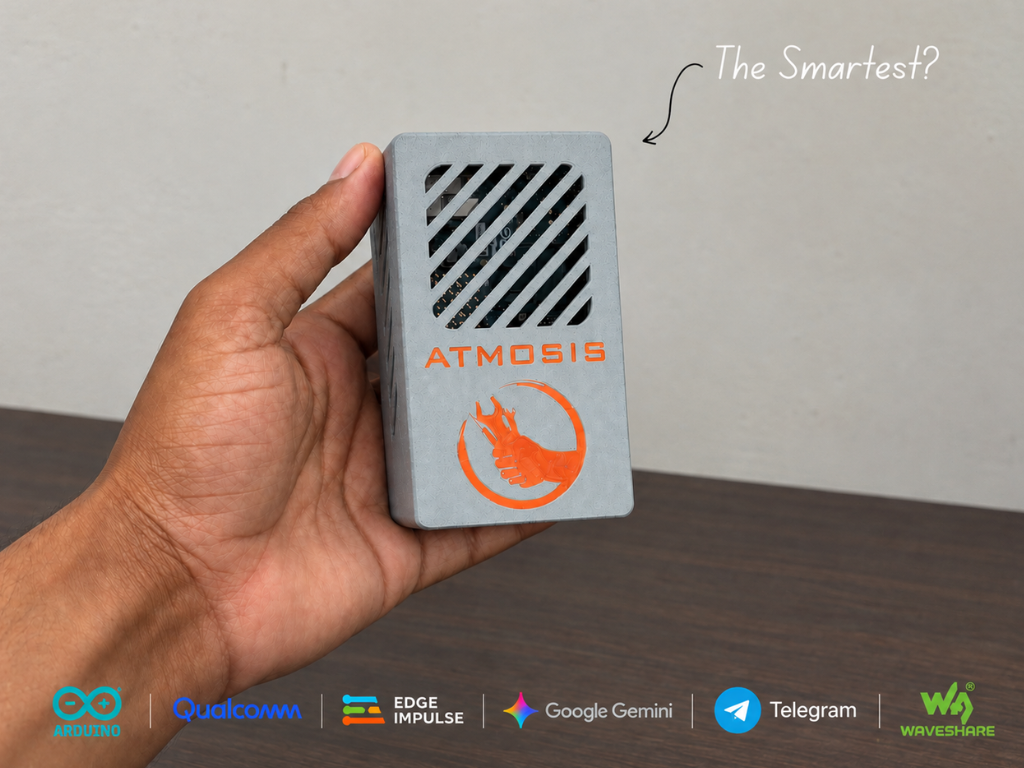
Atmosis ของ Next Builder เป็น Environmental Intelligence Project ที่ใช้ Arduino UNO Q อ่านข้อมูลสิ่งแวดล้อมหลายประเภท รวมเป็น Air Score 1–100 วิเคราะห์ Pattern ด้วย Edge Impulse และใช้ Gemini ช่วยแปลข้อมูลให้เป็นคำแนะนำที่อ่านเข้าใจง่าย
ระบบยังมี Dashboard, Telegram Notification, RGB Status Light และ Enclosure พิมพ์ 3D แต่จุดที่สำคัญคือ Safety Logic หลัก อย่าง Dust และ CO Alarm ยังทำงานอยู่ฝั่ง Microcontroller โดยไม่ต้องรอ Cloud AI
- ใช้ Arduino UNO Q ที่มีทั้ง STM32U585 และ Qualcomm QRB2210
- ติดตามข้อมูลสิ่งแวดล้อม 9 ค่า
- รวมค่ามลพิษเป็น Custom Air Score 1–100
- Safety Logic หลักรันบน Microcontroller
- ส่งข้อมูลจาก MCU ไป Linux แบบ One-way ผ่าน Bridge
- ใช้ Edge Impulse วิเคราะห์ Pattern ของข้อมูล Sensor
- Current Model ใน GitHub v1.2 มี 3 Classes
- Gemini ใช้สร้างคำแนะนำ ไม่ได้เป็นตัวตัดสิน Safety Alarm
- Dashboard รันบน UNO Q และเปิดจากอุปกรณ์ใน Network เดียวกัน
- มี Telegram Alert, STL, Circuit Diagram และ Source Code ให้ดาวน์โหลด
Atmosis ต่างจาก Air Quality Monitor ทั่วไปอย่างไร?
ปัญหาของ Environmental Monitor ไม่ใช่แค่เรื่อง “Sensor อ่านค่าได้หรือไม่” แต่คือเมื่อมี Sensor หลายตัว ผู้ใช้ต้องตีความตัวเลขหลายชุดพร้อมกัน
Atmosis จึงแบ่งงานออกเป็นหลาย Layer:
↓
สร้าง Air Score
↓
ตรวจ Safety Threshold
↓
วิเคราะห์ Pattern ด้วย Edge AI
↓
แปลสถานการณ์ด้วย Gemini
↓
Dashboard / Telegram / RGB Light
แนวคิดสำคัญคือ AI ไม่ได้ถูกวางไว้ตรงกลาง Safety Loop แต่เป็น Layer เสริมสำหรับ Interpretation และ User Experience
Arduino UNO Q แบ่งงานระหว่าง MCU กับ Linux อย่างไร?
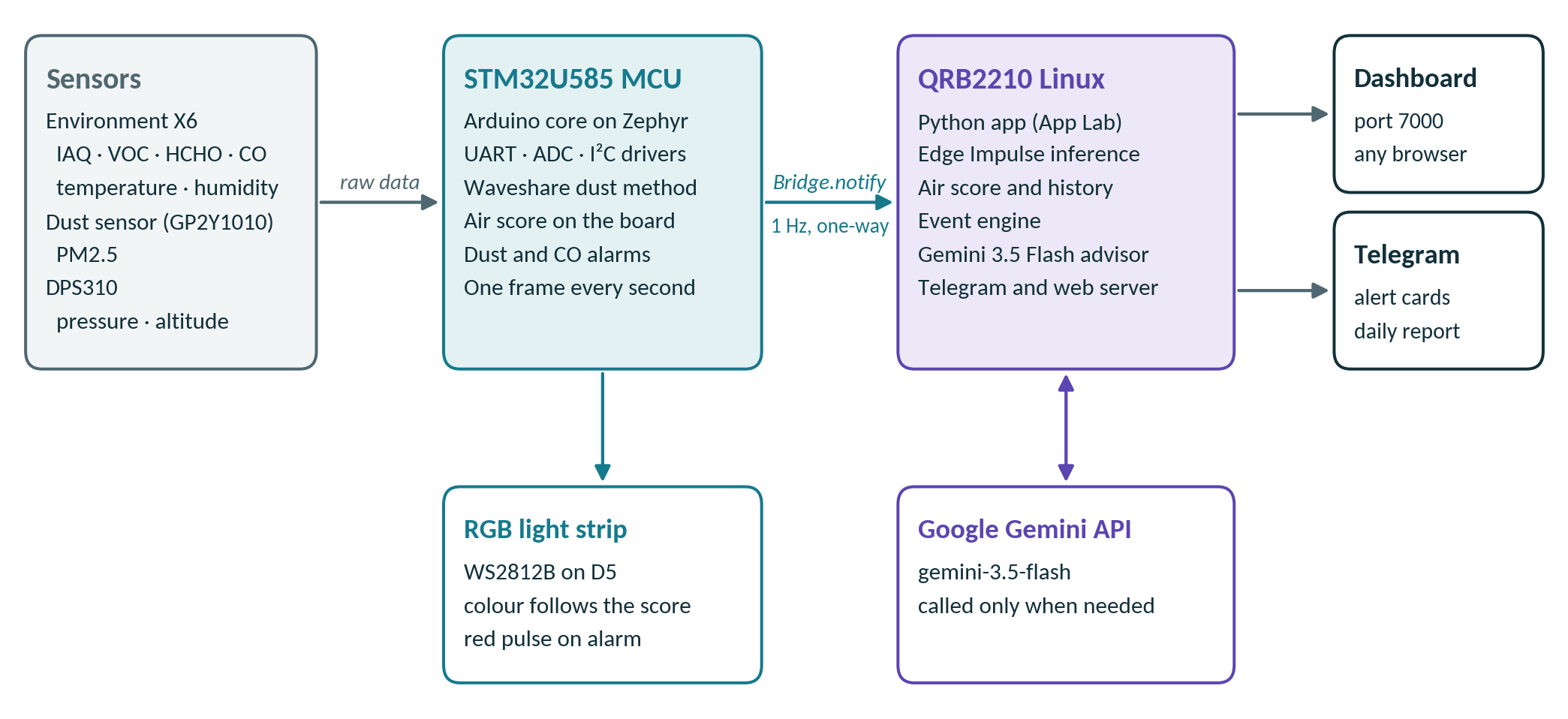
อ่าน Sensor, คำนวณ Air Score, คุม RGB Strip, ตรวจ Dust / CO Alarm และส่งข้อมูลไป Linux
รัน Debian Linux และจัดการ Edge Impulse, Gemini, Telegram, Dashboard, History และ Event Logic
ผู้สร้างออกแบบ Core Monitoring ให้ Microcontroller สามารถอ่าน Sensor, คำนวณ Score และควบคุม Alarm / Light ต่อได้ แม้ App หรือ Internet ไม่ทำงาน
Hardware ที่ใช้ใน Atmosis
| Hardware | หน้าที่ |
|---|---|
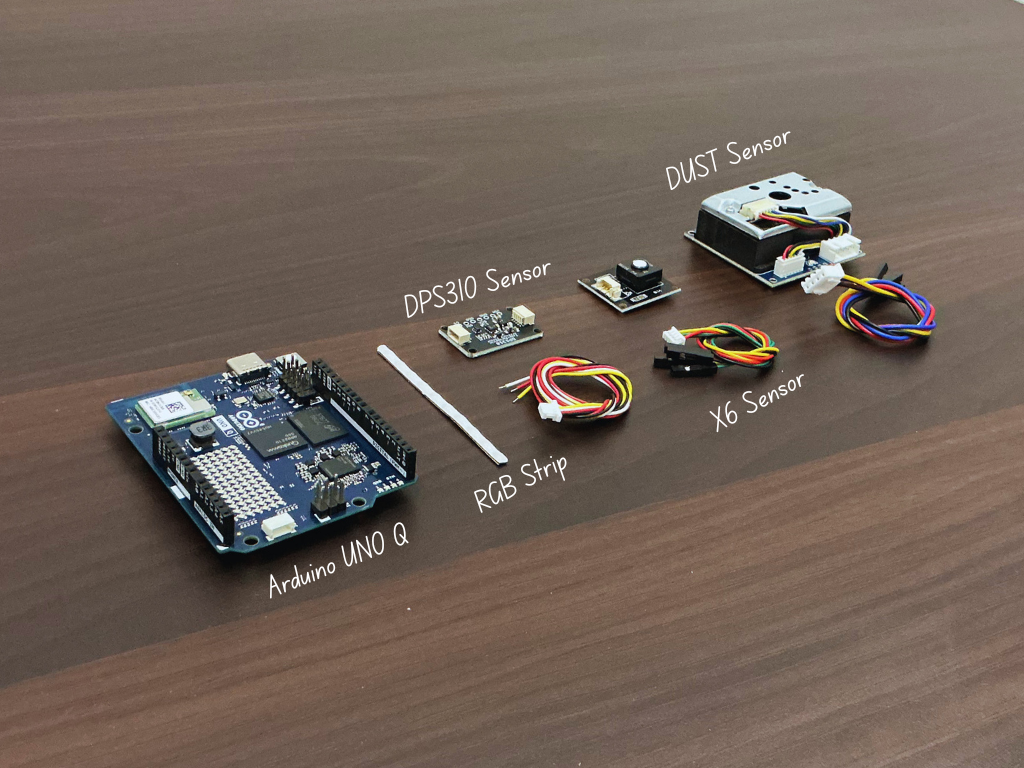
| Arduino UNO Q | Main Board สำหรับ Microcontroller + Linux Processing |
| Waveshare Environment X6 | IAQ, TVOC, HCHO, CO, Temperature, Humidity |
| Waveshare Dust Sensor | ตรวจ PM2.5 |
| DPS310 | Pressure และ Altitude |
| Waveshare RGB COB Strip | แสดงสถานะ Air Quality ด้วยสี |
| 3D Printed Housing | จัดตำแหน่ง Board และ Sensor พร้อมช่องให้อากาศผ่าน |
Wiring Environment X6, Dust Sensor, DPS310 และ RGB Strip
| Module | Power | Signal |
|---|---|---|
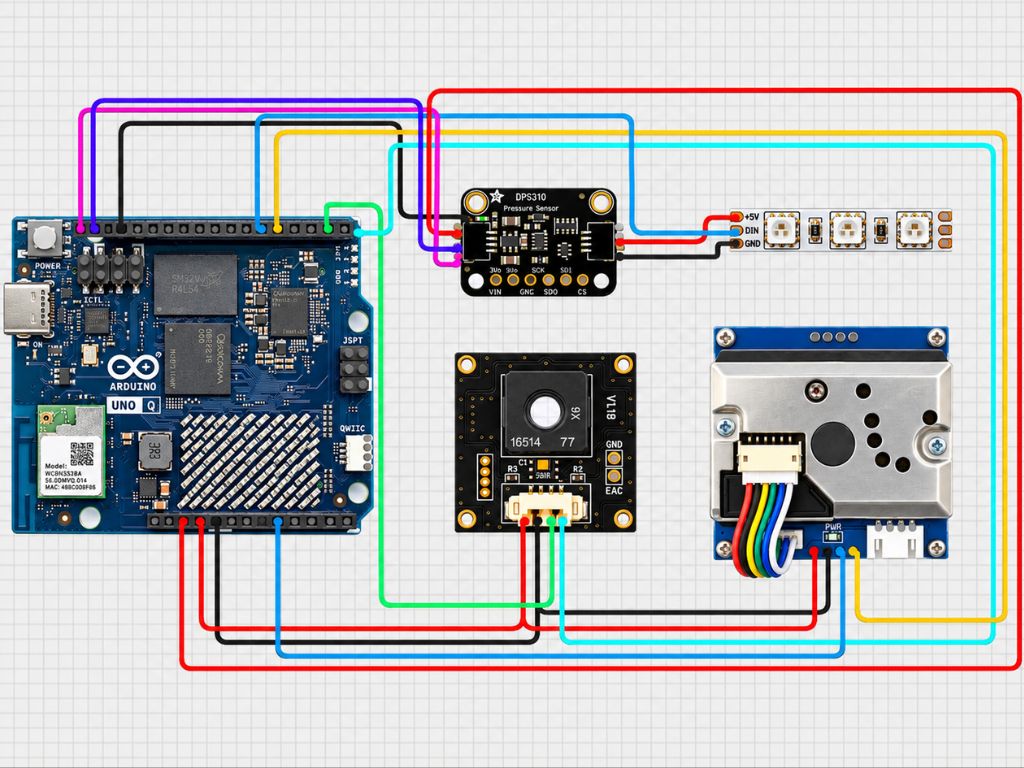
| Environment X6 | 5V / GND | TXD → D0, RXD → D1 |
| Dust Sensor | 5V / GND | ILED → D4, AOUT → A0 |
| DPS310 | 3.3V / GND | SDI → SDA, SCK → SCL |
| RGB Strip | 5V / GND | DIN → D5 |
ควรยึด Module และ Wiring ตาม Source และไม่ควรแทนด้วย Sensor คนละรุ่น โดยสมมติว่า Voltage / Logic Level เหมือนกัน
Current Troubleshooting Guide ระบุว่า 3.3V ไม่เพียงพอสำหรับ Dust Sensor Module ที่ใช้ใน Project
Environment X6 วัดอะไรบ้าง?
Environment X6 เป็น Sensor หลักสำหรับข้อมูล Gas และ Ambient Condition โดย Atmosis ใช้ค่าต่อไปนี้:
- IAQ
- TVOC
- HCHO / Formaldehyde
- CO
- Temperature
- Humidity
Current Firmware ติดต่อ Module ผ่าน UART Protocol และตรวจ Checksum ของ Frame ก่อนนำข้อมูลไปใช้
UART ของ X6 ใน Source ใช้ 9600 baud และตัว Firmware จะ Reject Reading ที่ไม่ผ่าน Plausibility Check ก่อนส่งต่อเข้าสู่ Air Score และ Linux App
PM2.5 Sensor ไม่ได้อ่าน Analog A0 แบบธรรมดา
Dust Sensor ที่ใช้ใน Atmosis มี Infrared LED ภายใน และต้องอ่านค่าในจังหวะสัมพันธ์กับ LED Pulse
Firmware Trigger LED ของ Dust Sensor
Source ใช้ Timing ตามวิธี Reference ของ Module
Analog Signal ถูก Sample ในช่วงที่กำหนด
Firmware คำนวณค่าและทำ Filtering ก่อนนำไปใช้
Module ที่ Source ใช้มี Voltage Divider และ Sampling Method เฉพาะ การเปลี่ยน Module อาจทำให้ Signal Level และสูตรคำนวณไม่ตรงกับ Firmware
Air Score 1–100 คำนวณอย่างไร?
Atmosis ไม่ใช้ค่าจาก Sensor ตัวใดตัวหนึ่ง เป็นคะแนนรวมโดยตรง แต่สร้าง Sub-score จาก Pollutant หลายรายการ:
- PM2.5
- TVOC
- HCHO
- CO
- IAQ
จากนั้นเลือก Sub-score ที่ต่ำที่สุด เป็น Overall Air Score
TVOC Score
HCHO Score
CO Score
IAQ Score
↓
เลือกค่าต่ำที่สุด
↓
Atmosis Air Score 1–100
ผู้สร้างอธิบายว่า Breakpoint อิงแนวทาง WHO / EPA แต่ Score 1–100 นี้เป็น Logic ที่ Project สร้างขึ้น ไม่ควรเรียกว่า AQI มาตรฐานทางการ
constexpr ScoreEdges EDGES_PM = {{0, 12, 35, 55, 150, 250}};
constexpr ScoreEdges EDGES_CO = {{0, 2, 4.5f, 9, 15, 35}};

if (dustValid) {
  worst = lower(worst, subScore(pm, EDGES_PM));
}

if (gasValid) {
  worst = lower(worst, subScore(co, EDGES_CO));
}
ทำไม Atmosis ส่งข้อมูลจาก MCU ไป Linux แบบ One-way?
ทุกประมาณหนึ่งวินาที Microcontroller จะส่ง Sensor Frame ใหม่ ไปยัง Linux ผ่าน Arduino RouterBridge
Current Design ตั้งใจไม่ให้ Linux ส่ง Command กลับไปควบคุม Core Sensor Loop
ถ้า Python App, Dashboard, Gemini หรือ Internet มีปัญหา Microcontroller ยังสามารถตรวจ Sensor และจัดการ Alarm / RGB Light ต่อได้
Bridge.notify("atmosis_frame",
              (int)FRAME_PROTOCOL,
              (int)(++frameSeq),
              statusFlags(),
              lastX6.iaq,
              lastX6.tvoc_ppm,
              lastX6.co_ppm);
Edge Impulse วิเคราะห์ Pattern ของอากาศอย่างไร?
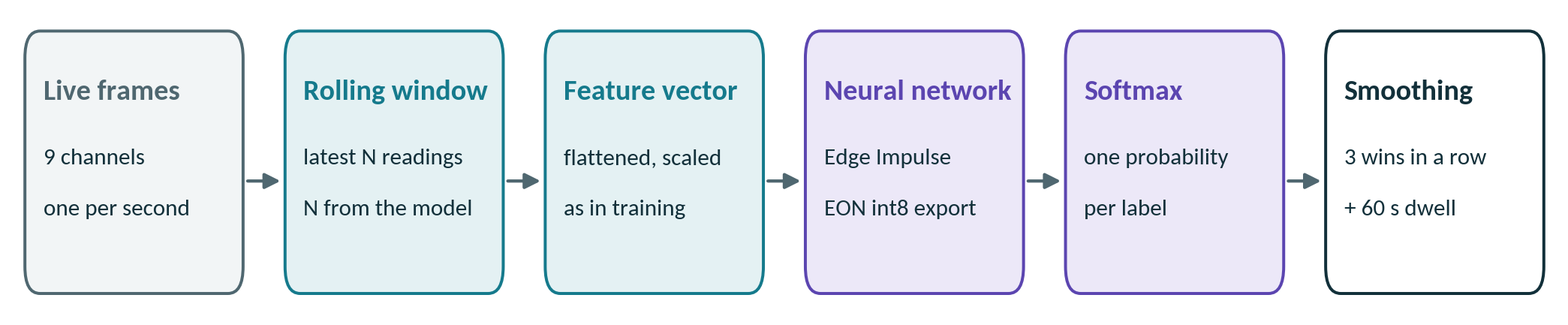
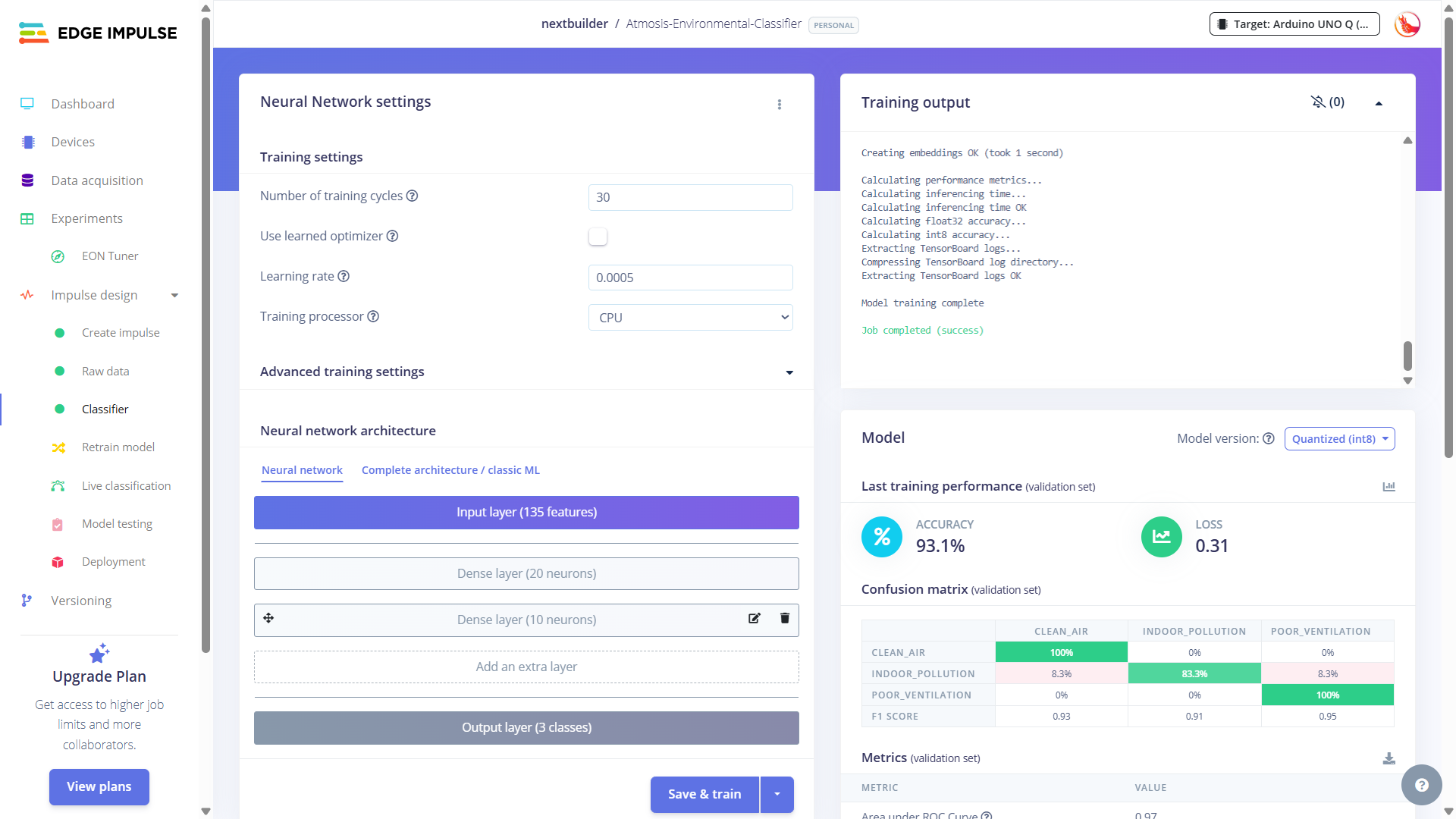
Current Model ใน Repository รับข้อมูลทั้งหมด 9 Axes:
- IAQ
- TVOC
- HCHO
- CO
- Temperature
- Relative Humidity
- PM2.5
- Pressure
- Altitude
Model Metadata ปัจจุบันระบุ:
| รายการ | Current Bundled Model |
|---|---|
| Axes | 9 |
| Samples ต่อ Window | 15 |
| Feature Input | 135 |
| Frequency | 5 Hz |
| Processing | Raw Data |
| Deployment | Quantized INT8 / EON Compiler Artifact |
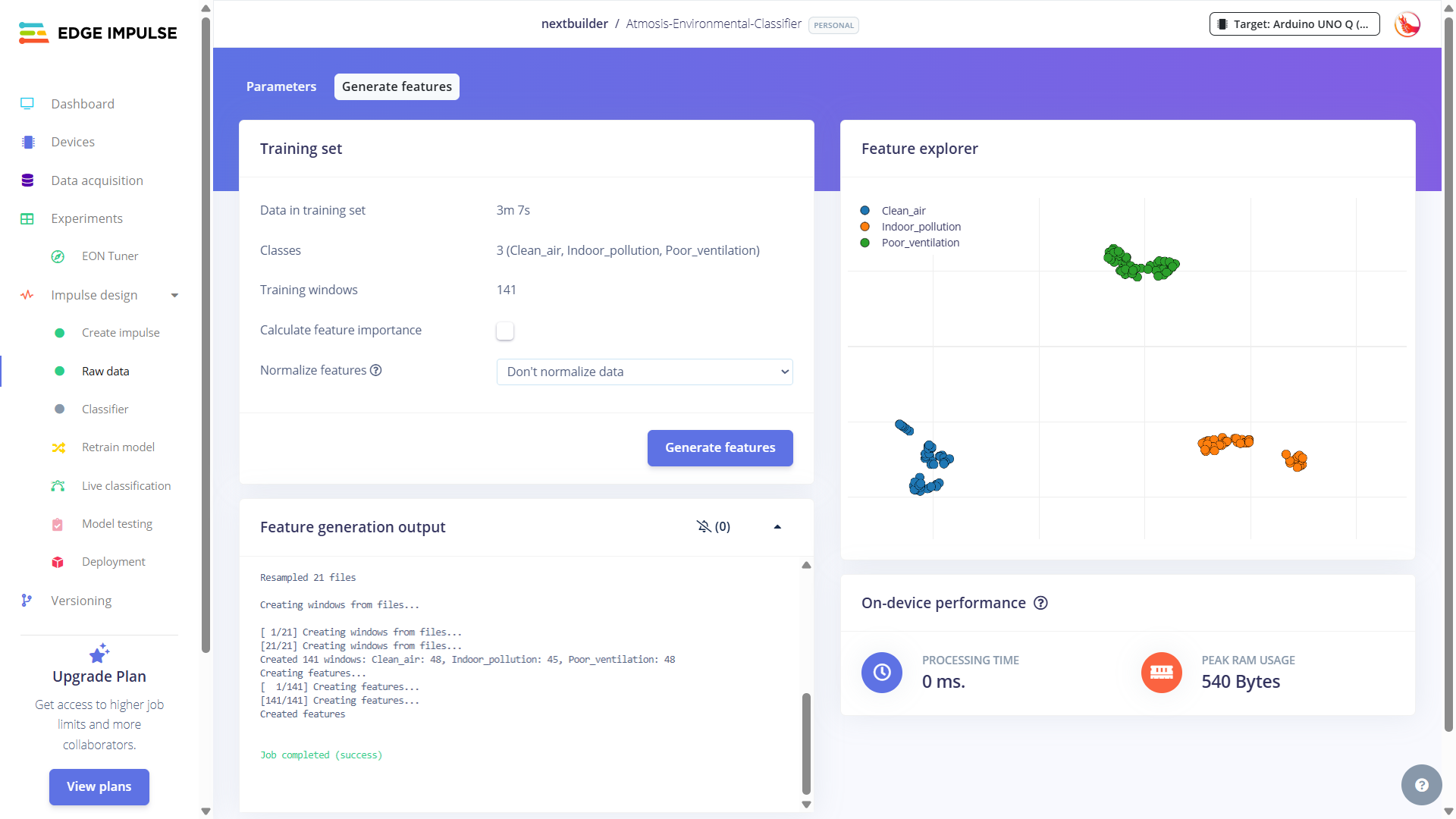
Current Model มี 3 Classes ไม่ใช่ 7 Patterns
Project Overview และ README อธิบายแนวคิด Dataset ไว้ถึง 7 Environmental Patterns เช่น Traffic Pollution, Construction Dust และ Biomass Burning
แต่เมื่อดู Model Artifact ที่ถูก Bundle อยู่ใน Current GitHub v1.2 จริง ไฟล์ Model ระบุเพียง 3 Labels:
- Clean_air
- Indoor_pollution
- Poor_ventilation
7 Pattern เป็น Scope / Dataset Concept ที่ผู้สร้างอธิบายไว้ แต่ Current Bundled Model ที่ตรวจใน Repository v1.2 มี 3 Classes
แล้ว Accuracy 93.1% หมายความว่าอะไร?
Hackster ระบุ Validation Accuracy ประมาณ 93.1% สำหรับ Training Run ที่แสดงใน Project
ค่านี้ควรอ่านว่าเป็น Validation Result ของ Dataset / Model Run นั้น ไม่ใช่การรับรองว่า Atmosis จะจำแนกสภาพอากาศจริงทุกสถานที่ได้แม่น 93.1%
3 Hz หรือ 5 Hz?
Hackster Training Step บางส่วนกล่าวถึง 3 Hz แต่ Current Model Metadata ใน GitHub ระบุ 5 Hz และ Interval 200 ms
บทความนี้จึงยึด Current Model Metadata = 5 Hz สำหรับ Model ที่ Bundle อยู่ใน Repository ปัจจุบัน
Machine Learning ทายครั้งเดียว ยังไม่พอให้ระบบ Alert
Atmosis เพิ่มขั้นตอนกรองผล Classification เพื่อลดการแกว่งของ Label
↓
Label เดิมต้องชนะ 3 Windows ติดต่อกัน
↓
กลายเป็น Stable Label
↓
Pattern ต้อง Hold ต่อเนื่องประมาณ 60 วินาที
↓
จึงพิจารณาส่ง Pattern Alert
แนวคิดนี้สำคัญมากสำหรับ Sensor AI: Prediction ไม่เท่ากับ Event
การทำ Debounce / Dwell Time ช่วยลดปัญหา Notification จาก Noise หรือ Reading ที่แกว่งชั่วคราว
Gemini Advisor ทำอะไร และไม่ทำอะไร?
Gemini ถูกใช้เพื่อเปลี่ยน Sensor Data และ Current Situation ให้กลายเป็นคำแนะนำที่คนอ่านเข้าใจได้ง่ายขึ้น
Current Configuration ระบุ Default Model String เป็น gemini-3.5-flash
Core Air Score, Dust Alarm และ CO Alarm ไม่ได้รอ Gemini ตัดสิน แต่ทำงานอยู่บน MCU / Local Logic
AI Advisor ถูกออกแบบให้:
- ตอบจาก Reading ปัจจุบัน
- ให้ Recommendation แบบสั้น
- ไม่พูดเป็น Medical Diagnosis
- ไม่เรียก Cloud ทุกวินาที
- มี Retry / Cooldown เมื่อ Service Busy
Health Sensitivity Context
Current App มี Health Profile Field เช่น Age และ Condition บางประเภท แต่ Context ที่ส่งเข้า Advisor ถูกลดเป็นระดับ standard หรือ heightened sensitivity ใน Workflow ที่ตรวจจาก Source
AI Advice ใช้เพื่อช่วยตีความ Environmental Data ไม่ควรใช้แทนการวินิจฉัย, การรักษา หรือคำแนะนำจากบุคลากรทางการแพทย์
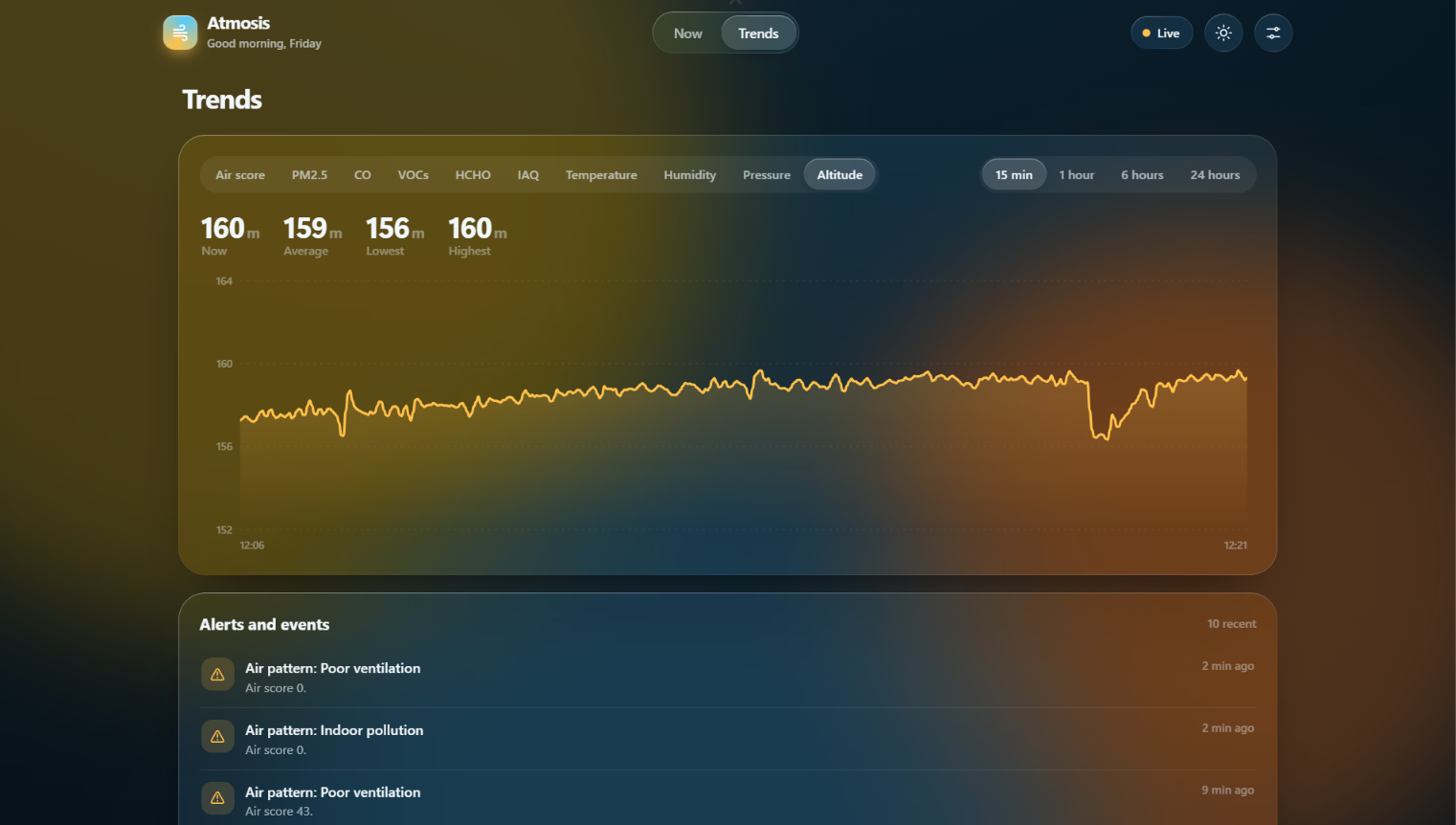
Live Dashboard รวม Score, Sensor และ Trends ไว้หน้าเดียว
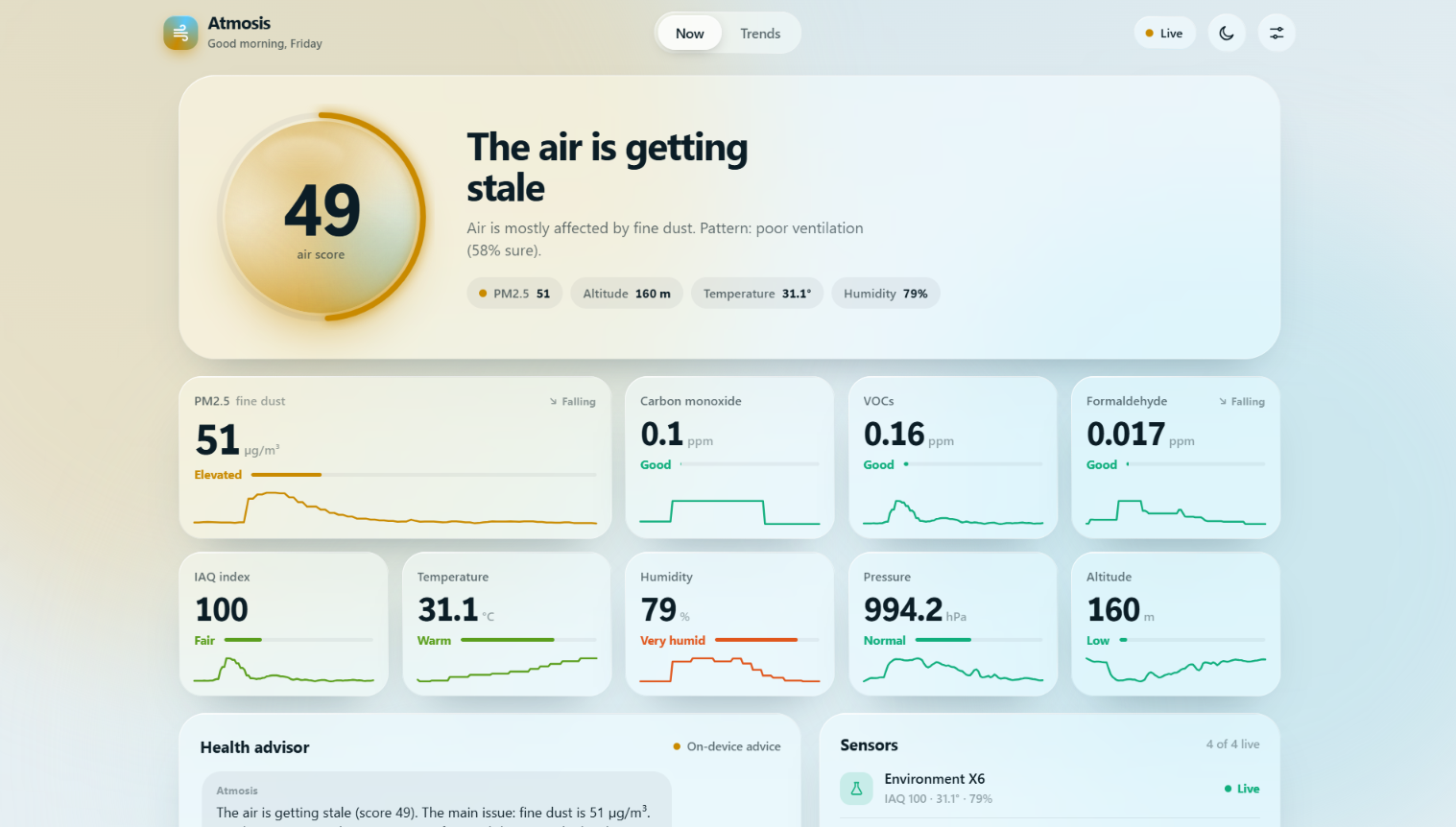
Dashboard รันฝั่ง Linux บน UNO Q และใช้ Port 7000
ผู้ใช้สามารถเปิดจาก Smartphone หรือ Laptop ที่อยู่ใน Wi-Fi Network เดียวกัน โดยใช้ IP Address ของ Board
Interface รวม:
- Air Score
- Live Sensor Readings
- Environmental Pattern
- Trend / History
- Sensor Status
- Gemini Advisor
- Light / Dark Theme
Telegram Alert ช่วยให้ไม่ต้องเปิด Dashboard ตลอดเวลา
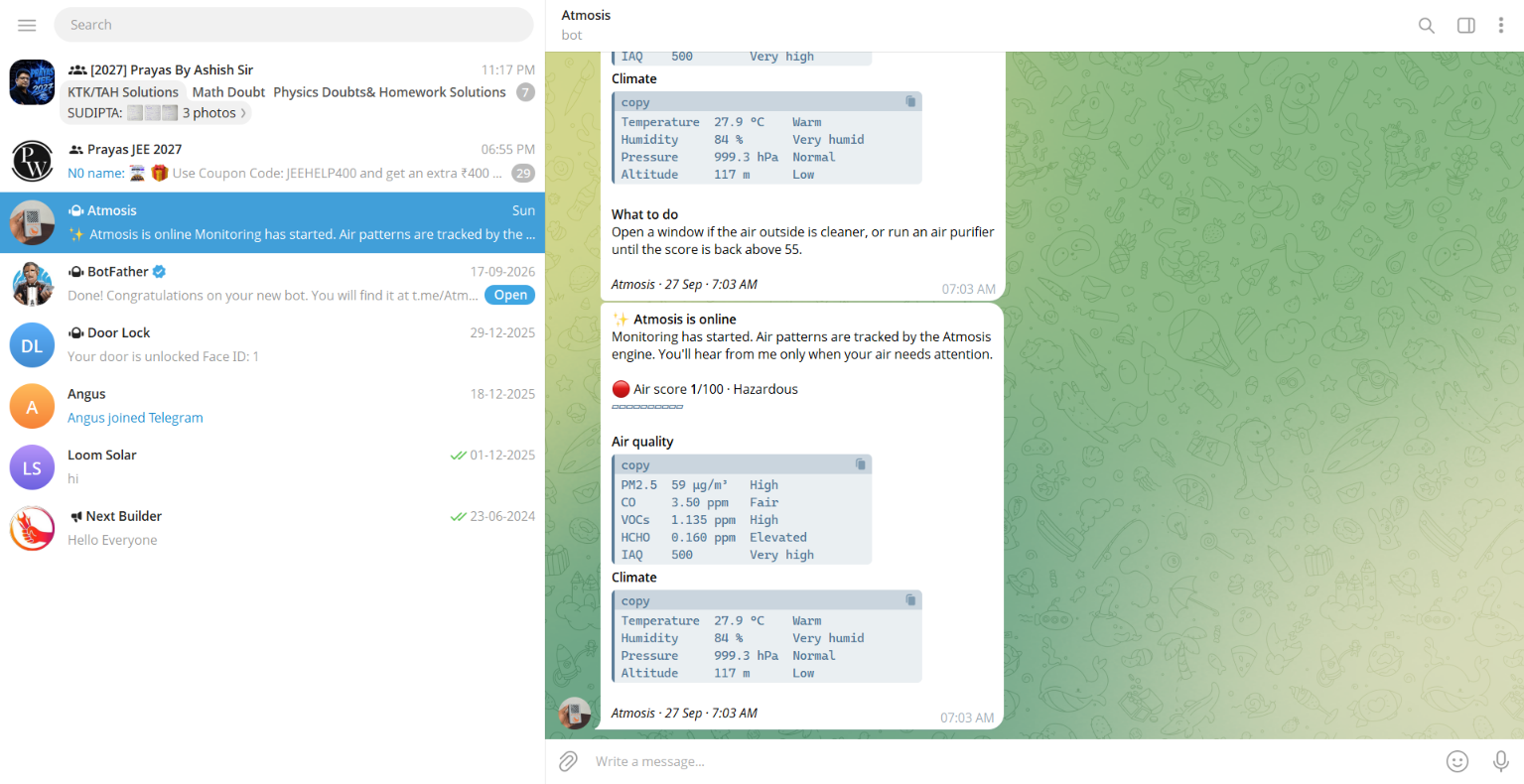
Source ระบุ Trigger ตัวอย่าง เช่น:
| Trigger | พฤติกรรม |
|---|---|
| Air Score ≤ 35 | แจ้งว่า Air Quality ต้องการ Attention |
| PM2.5 > 150 µg/m³ | Dust Alert |
| CO > 9 ppm | CO Alert |
| Pollution Pattern | Pattern Notification หลังผ่าน Stability Logic |
| Board Silent 2 นาที | Sensor / Link Offline Alert |
| 21:00 | Daily Report ตามค่า Default ใน Current Config |
ระบบมี Cooldown และ Rate Limiting เพื่อไม่ให้ Reading ที่แกว่งใกล้ Threshold สร้าง Notification ซ้ำถี่เกินไป
ถ้าไม่ได้ตั้ง Bot Token หรือ Chat ID Feature แจ้งเตือนจะไม่ทำงาน แต่ Core Sensor Monitoring ยังสามารถทำงานต่อได้
3D Printed Housing ออกแบบให้ Sensor ได้สัมผัสอากาศจริง
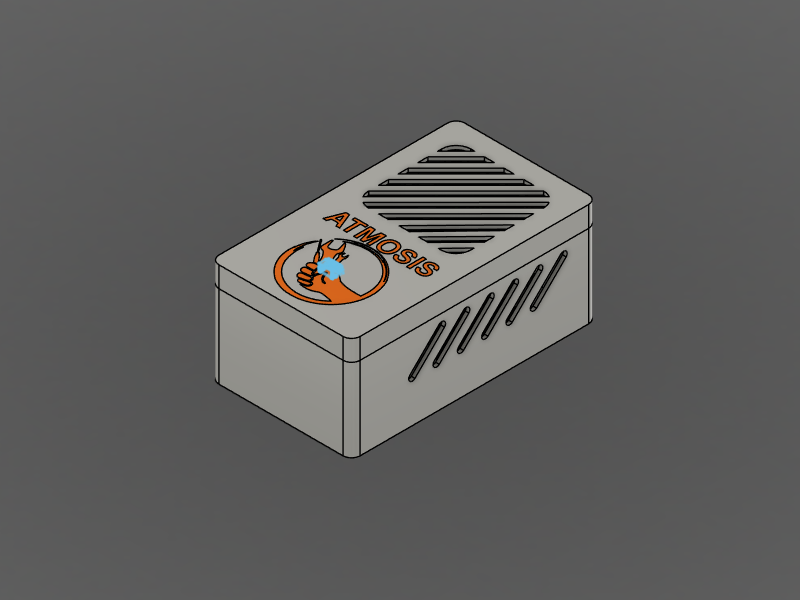
Official Repository มี STL จริง 2 ไฟล์:
- Housing.stl
- Cover.stl
Source ระบุว่า Enclosure ออกแบบใน Autodesk Fusion โดยตัว Main Housing ใช้ Gray PLA และ Text / Logo ใช้ Orange PLA ใน Build ของผู้สร้าง
ไม่มีข้อมูลยืนยันสำหรับ Layer Height, Infill, Nozzle Size, Print Speed, Bed Temperature, Nozzle Temperature หรือ Support Setting
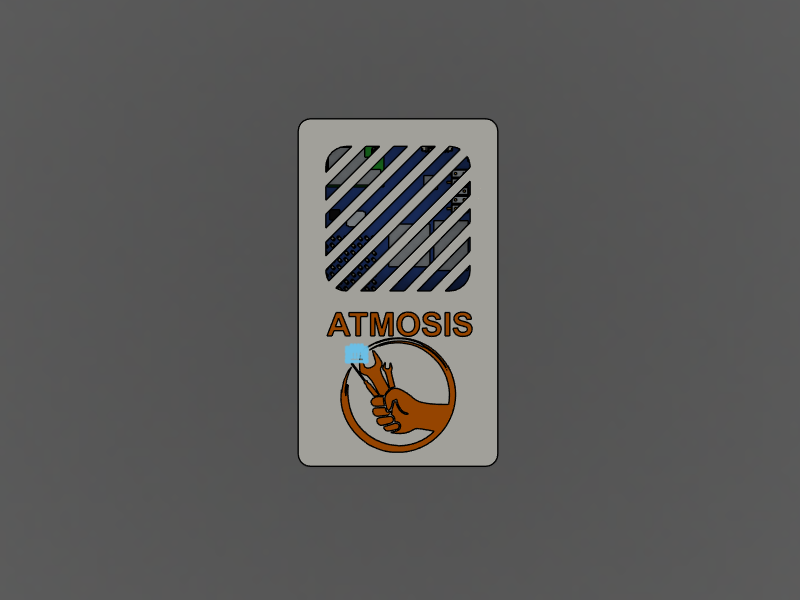
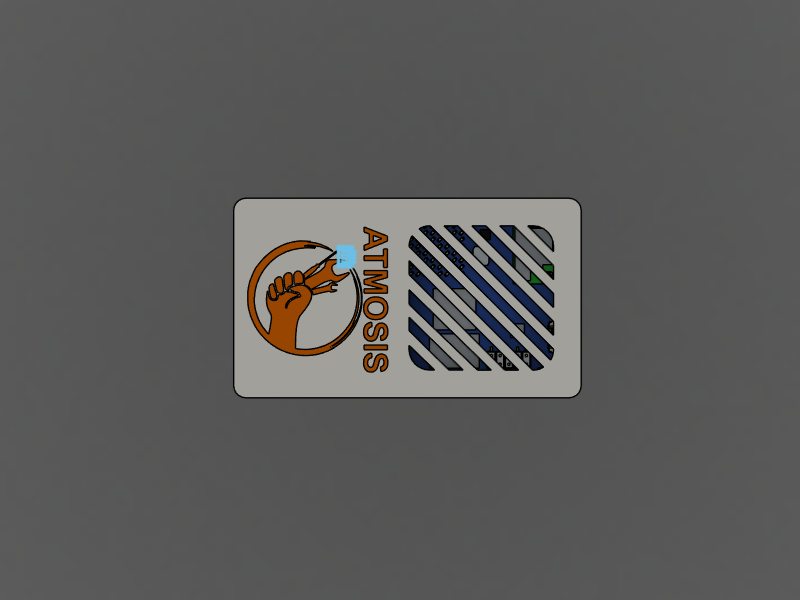
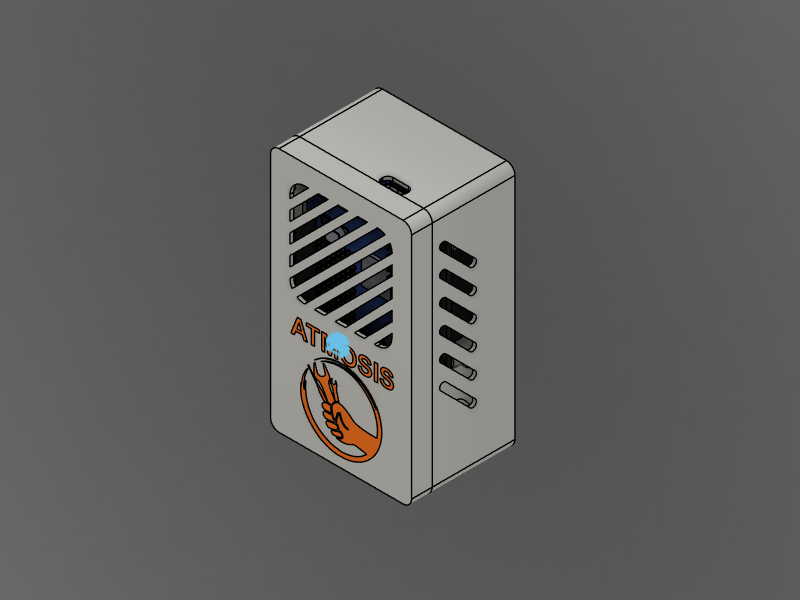
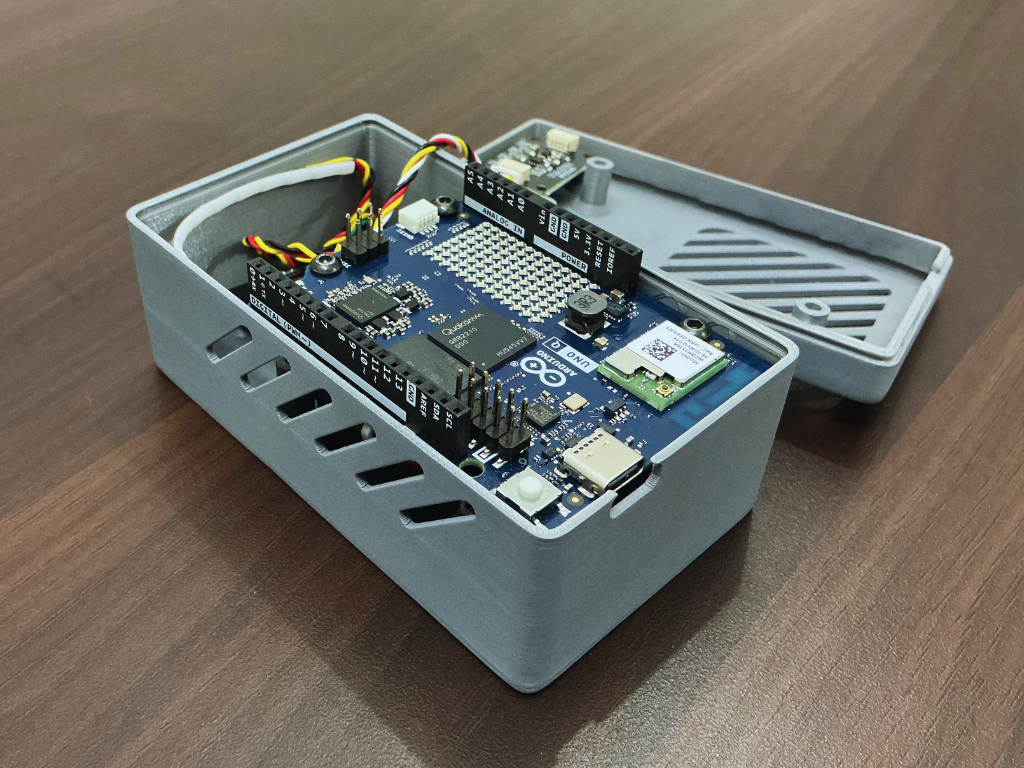
สามารถส่ง Housing.stl และ Cover.stl ให้ทีม GlobalByte ช่วยประเมินบริการ 3D Printing ได้ โดยใช้ไฟล์จาก Project ต้นฉบับเป็นหลัก
ดู Housing และ Cover แบบ 3D
ติดตั้ง Atmosis ผ่าน Arduino App Lab
Current Repository จัด Project ให้อยู่ในรูปแบบ Arduino App Lab โดยรวมทั้ง Firmware ฝั่ง MCU และ Python App ฝั่ง Linux ไว้ใน Project เดียว
Source แนะนำให้เริ่มจาก Release ล่าสุด
เพิ่ม Gemini API Key และ Telegram Credential ในไฟล์ Environment Configuration ถ้าต้องการใช้ Feature เหล่านี้
เปิด Project Folder แล้วกด Run
ใช้ IP Address ของ UNO Q และ Port 7000 จากอุปกรณ์ที่อยู่ใน Network เดียวกัน
| Environment Variable | ใช้สำหรับ |
|---|---|
| GEMINI_API_KEY | Gemini Advisor |
| TELEGRAM_BOT_TOKEN | Telegram Bot |
| TELEGRAM_CHAT_ID | ปลายทางสำหรับ Notification |
Current Project แยกไฟล์ Environment Configuration ออกจาก Git Tracking เพื่อช่วยลดความเสี่ยงในการเผลอเผย Secret
ดู Atmosis ทำงานจริง
โปรเจกต์นี้มีหลายขั้น แนะนำอ่านต้นฉบับควบคู่กัน
Atmosis มีทั้ง Firmware, Python App, Edge Impulse Artifact, Data Collection Code, Circuit Diagram และ STL จึงควรเปิด Official Repository ควบคู่ระหว่าง Build
Official GitHub Repository
รวม Firmware, Python App, Model, CAD และ Circuit Diagram
เปิด Official GitHubArduino App Lab Guide
Setup, Configuration, Dependencies และ Troubleshooting
อ่าน Arduino App Lab GuideHackster Build Guide
Main Project Article พร้อม Build Steps และภาพประกอบ
อ่าน Tutorial ฉบับเต็มจาก HacksterTop-level Repository ระบุ MIT License แต่ Edge Impulse-generated files มี License Notice ของ Edge Impulse ภายในไฟล์เอง จึงควรตรวจเงื่อนไขก่อนนำ Model Artifact ไปใช้ต่อหรือแจกจ่าย
สิ่งที่ Maker เรียนรู้จาก Atmosis
Real-time Sensor Logic และ Linux AI Workload ไม่จำเป็นต้องอยู่ Processor เดียวกัน
Threshold Alarm สามารถทำงาน Local ส่วน Gemini ใช้ช่วย Interpretation
Edge AI Output ถูก Debounce ก่อนนำไปสร้าง Event หรือ Notification
การมี Sensor หลายตัว ต้องจัดการ Sampling, Missing Data, Timing และ Validity ก่อนป้อนเข้า Model
FAQ — คำถามเกี่ยวกับ Atmosis และ Arduino UNO Q
1. Atmosis ใช้บอร์ดอะไร?
ใช้ Arduino UNO Q ซึ่งมี STM32U585 Microcontroller และ Qualcomm QRB2210 สำหรับ Linux Processing
2. Atmosis วัดอะไรได้บ้าง?
Project ใช้ 9 Readings ได้แก่ IAQ, TVOC, HCHO, CO, Temperature, Humidity, PM2.5, Pressure และ Altitude
3. Air Score เป็น AQI มาตรฐานหรือไม่?
ไม่ เป็น Custom Score 1–100 ของ Project โดยใช้ Pollutant Sub-score หลายค่าแล้วเลือกค่าที่แย่ที่สุด
4. Atmosis ต้องต่อ Internet ตลอดเวลาหรือไม่?
ไม่ Core Sensor Reading, Air Score, RGB Light และ Alarm Logic อยู่ฝั่ง Microcontroller และทำงานได้โดยไม่ต้องใช้ Gemini หรือ Telegram
5. Gemini เป็นคนตัดสินว่า CO อันตรายหรือไม่?
ไม่ CO Alert Logic หลักอยู่ใน Local Firmware ส่วน Gemini ใช้สร้างคำแนะนำจากสถานการณ์
6. Atmosis ใช้ Edge Impulse หรือไม่?
ใช่ Current Repository มี Edge Impulse-generated Model Artifact สำหรับ Environmental Classification
7. Current Model แยกได้กี่ Classes?
Current Bundled Model v1.2 ที่ตรวจมี 3 Classes: Clean_air, Indoor_pollution และ Poor_ventilation
8. แล้ว 7 Air Patterns ที่ README กล่าวถึงคืออะไร?
README อธิบาย Dataset / Project Scope ไว้กว้างถึง 7 Pattern แต่ Current Bundled Model มี 3 Classes จึงไม่ควรถือว่า Current Firmware จำแนกครบ 7 แบบ
9. Accuracy 93.1% หมายความว่าแม่นจริง 93.1% ทุกบ้านหรือไม่?
ไม่ ค่านี้เป็น Validation Accuracy ที่ผู้สร้างรายงานสำหรับ Training Run ไม่ใช่ Field Accuracy Guarantee
10. Current Model ใช้ Sampling กี่ Hz?
Current Model Metadata ใน Repository ระบุ 5 Hz
11. Model ใช้ Input กี่ค่า?
15 Samples × 9 Axes รวมเป็น 135 Inputs ตาม Current Model Metadata
12. Dashboard เปิดจากโทรศัพท์ได้หรือไม่?
ได้ ถ้าโทรศัพท์อยู่ใน Network เดียวกับ UNO Q สามารถเปิด Dashboard ผ่าน IP Address ของ Board และ Port 7000
13. Telegram จำเป็นหรือไม่?
ไม่ เป็น Optional Notification Feature
14. Gemini จำเป็นหรือไม่?
ไม่ ถ้าไม่ได้ตั้ง API Key ระบบจะปิด AI Advisor แต่ Monitoring หลักยังทำงานได้
15. Atmosis ใช้แทน CO Alarm มาตรฐานได้หรือไม่?
ไม่ Source ไม่ได้ระบุ Certification สำหรับ Life-safety CO Alarm
16. Atmosis เป็น Medical Device หรือไม่?
Source ไม่ได้ระบุว่าเป็น Medical Device และ Gemini Advisor ไม่ควรถูกใช้แทน Medical Diagnosis
17. มี STL ให้ดาวน์โหลดหรือไม่?
มี Housing.stl และ Cover.stl ใน Official Repository
18. Source ระบุ Print Settings หรือไม่?
Source ไม่ได้ระบุ Layer Height, Infill, Nozzle Size, Print Speed หรือ Temperature Settings
19. ถ้า Edge Impulse Model ใช้งานไม่ได้ ระบบหยุดทั้งหมดหรือไม่?
Current App มี Rule-based Classifier สำรองสำหรับ Pattern Engine และ Core Sensor / Alarm Logic ยังอยู่ฝั่ง MCU
20. มี Source Code ให้ดาวน์โหลดหรือไม่?
มี Official GitHub Repository, Current Release, Arduino App Lab Project, Data Collection Code, Circuit Diagram และ CAD Files
สรุป: จุดน่าสนใจของ Atmosis ไม่ใช่แค่การใส่ AI ลงในเครื่องวัดอากาศ
Atmosis น่าสนใจตรงที่แยก Layer ของระบบค่อนข้างชัด
Microcontroller รับผิดชอบสิ่งที่ต้องทำงานต่อเนื่อง: Sensor, Air Score, Light และ Alarm
Linux Processor รับงานที่ซับซ้อนกว่า: Edge Impulse, Dashboard, History, Telegram และ Gemini
ผลคือ Cloud AI กลายเป็นตัวช่วยให้ข้อมูลเข้าใจง่ายขึ้น โดยไม่ได้กลายเป็น Single Point of Failure ของ Core Monitoring
อีกบทเรียนสำคัญคือ AI Model ต้องอ่านตาม Version จริง เพราะแม้ Project Overview จะพูดถึง 7 Environmental Patterns แต่ Current Model v1.2 ที่อยู่ใน Repository มีเพียง 3 Classes
สำหรับ Maker นี่จึงเป็น Project ที่ดีสำหรับเรียนรู้ Sensor Fusion, Dual-Processor Architecture, Edge AI, Environmental Monitoring, Web Dashboard และการออกแบบระบบให้ยังทำงานได้ แม้บาง Service จะ Offline
References / แหล่งข้อมูลต้นฉบับ
- อ่าน Atmosis Project บน Hackster.io
- ดู Official Atmosis GitHub Repository
- อ่าน Arduino App Lab Setup Guide
- ตรวจ Current Edge Impulse Model Labels
- ดู Air Score Logic
- อ่าน Arduino UNO Q Official Documentation
- อ่าน Environment X6 Official Documentation
- อ่าน Waveshare Dust Sensor Documentation
- ดู Atmosis Full Build Video
กำลังทำ Environmental Monitoring หรือ Edge AI Project?
Project แบบ Atmosis ต้องประสานทั้ง Development Board, Environmental Sensor, Analog / UART / I²C Interface และ Software หลาย Layer ให้ทำงานร่วมกัน
หากกำลังพัฒนา Arduino, ESP32, Sensor, IoT หรือ Edge AI Project สามารถสอบถามทีม GlobalByte เรื่องบอร์ดหรืออุปกรณ์ ที่เหมาะกับ Requirement ของงานได้
และหากมี STL แล้วแต่ไม่มีเครื่องพิมพ์ สามารถส่งไฟล์ Housing / Cover ให้ทีม GlobalByte ช่วยประเมินบริการ 3D Printing ได้
บทความนี้เป็นการสรุปและเรียบเรียงจากแหล่งข้อมูลภาษาอังกฤษ อาจมีความคลาดเคลื่อน กรุณาตรวจสอบ Source ต้นฉบับก่อนลงมือทำ
Atmosis เป็น DIY Environmental Monitoring Project ไม่ใช่ Certified Medical Device, Certified Air-quality Instrument หรือ Certified Carbon Monoxide Alarm สำหรับ Life-safety
Gemini Advisor ใช้เพื่อช่วยอธิบาย Environmental Reading และเสนอ Recommendation ไม่ใช่ระบบวินิจฉัยโรค หรือคำแนะนำทางการแพทย์
Air Score 1–100 เป็น Custom Score ของ Project ไม่ใช่ Official AQI หรือคะแนนมาตรฐานจาก WHO / EPA โดยตรง แม้ Breakpoint บางส่วนจะอ้างอิงแนวทางดังกล่าว
ค่า Validation Accuracy 93.1% ที่ Source กล่าวถึง เป็นผลจาก Training / Validation Run ไม่ใช่การรับประกัน Field Accuracy สำหรับทุกห้อง, ทุกสภาพแวดล้อม หรือ Sensor ทุกชุด
Project Overview กล่าวถึง 7 Environmental Patterns แต่ Current Bundled Edge Impulse Model ที่ตรวจใน GitHub v1.2 มี 3 Classes: Clean_air, Indoor_pollution และ Poor_ventilation
Hackster Training Workflow บางส่วนกล่าวถึง 3 Hz แต่ Current Model Metadata ระบุ Frequency 5 Hz บทความนี้จึงใช้ Current Repository เป็นข้อมูลหลักสำหรับ Model ที่ Bundle อยู่ใน v1.2
Sensor Accuracy, Calibration Interval, Long-term Drift, Replacement Interval และ Certification ของระบบ Atmosis ทั้งชุด Source ไม่ได้ระบุครบ จึงไม่ควรสร้างค่าหรือ Claim เพิ่มเติม
Source ไม่ได้ระบุ Battery Runtime, Outdoor Rating, Waterproof Rating, IP Rating หรือ Weather Resistance ของ Enclosure
Source มี STL สำหรับ Housing และ Cover แต่ไม่ได้ระบุ Layer Height, Infill, Nozzle Size, Print Speed, Support Setting หรือ Printing Temperature
Gemini API, Telegram และ Third-party Service สามารถเปลี่ยน API, Model, Plan หรือ Availability ได้ในอนาคต ควรตรวจ Documentation ล่าสุดก่อนติดตั้ง
Top-level Repository ระบุ MIT License แต่ Edge Impulse-generated files มี License Notice แยกภายใน Artifact ควรตรวจ License ที่เกี่ยวข้องก่อนนำ Model Files ไปใช้ต่อหรือแจกจ่าย


