
GlobalByte / Edge AI / Computer Vision / Robotics / GStreamer
ทำ AI Gimbal Tracking ด้วย reCamera และ Dragonwing IQ-9075
ทำให้กล้องหมุนตามวัตถุด้วย AI ฟังดูเหมือนงาน Computer Vision อย่างเดียว แต่ในระบบจริงยังต้องต่อ Video Decode, AI Inference, Target Selection, PID Control และ Motor Command เข้าด้วยกันอีกหลายชั้น
Project ของ Naveen เลือกแก้โจทย์นี้ด้วย Qualcomm Intelligent Multimedia SDK หรือ QIM SDK โดยเปลี่ยน AI Inference และ Multimedia Processing ให้กลายเป็น GStreamer Elements ที่นำมาต่อเป็น Pipeline ได้โดยตรง
ภาพจาก reCamera Gimbal 2002w ถูกส่งผ่าน RTSP ไปยัง Dragonwing IQ-9075 EVK เพื่อรัน Hand Detection บน NPU จากนั้น Python Tracker จะเลือก Target, คำนวณ Error จากกลางภาพ, ผ่าน EMA และ PID ก่อนส่ง Yaw / Pitch กลับไปควบคุม Gimbal ผ่าน MQTT
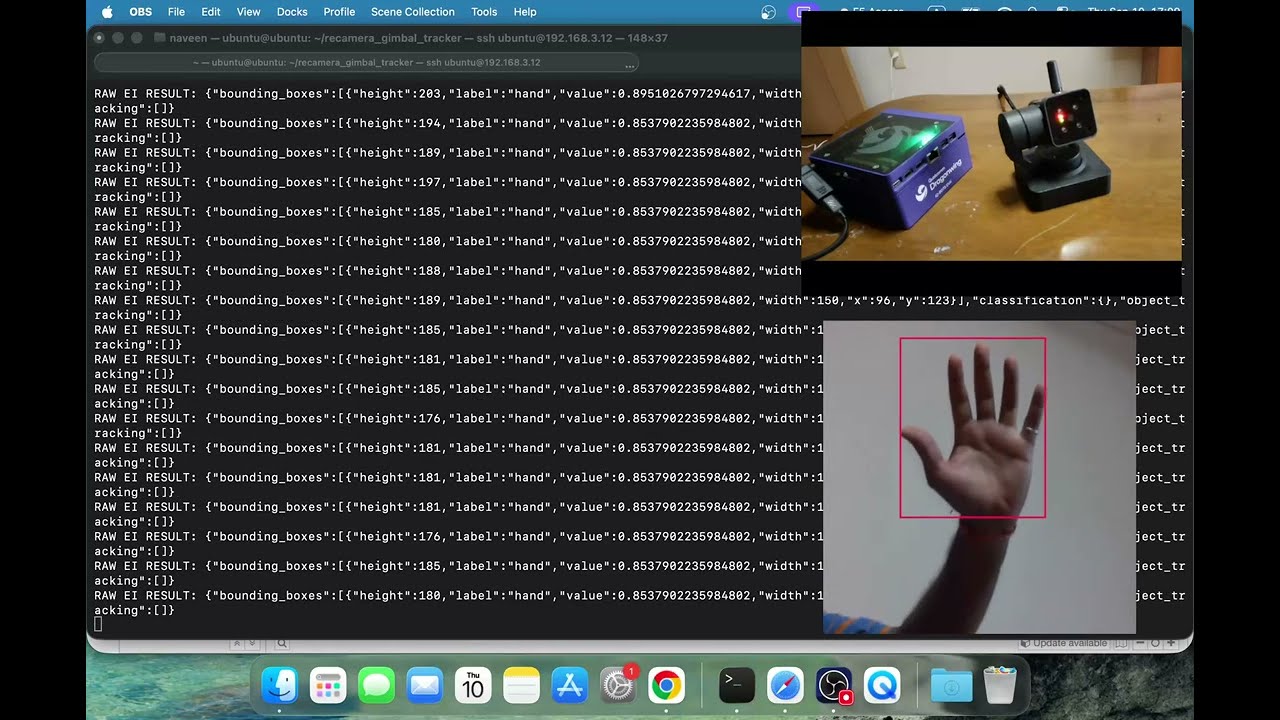
- Dragonwing IQ-9075 EVK ทำหน้าที่รัน Edge AI และ Tracking Logic
- reCamera Gimbal 2002w ส่ง Video ผ่าน RTSP และรับ Motor Command ผ่าน MQTT
- Model ถูก Train ด้วย Edge Impulse และใช้ YOLO-Pro
- Model Input คือ 320 × 320 RGB
- Deployment Target คือ Qualcomm IM SDK GStreamer Plugin แบบ AARCH64 + QNN
- Inference ถูกใช้เป็น GStreamer Element แทนการแยก AI Runtime ออกมาต่างหาก
- ตำแหน่ง Target ถูก Smooth ด้วย EMA ก่อนเข้า PID
- Current PID ใช้ Ki = 0 จึงทำงานในลักษณะ PD Controller
- Motor Commands ถูกจำกัด Rate และ Angle Range ใน Tracking Script
- ผู้สร้างระบุว่ายังเห็น Oscillation และ PID ยังต้อง Tune เพิ่ม
ทำไม AI Camera Tracking ถึงซับซ้อนกว่าการ Detect Object?
การ Detect ว่ามีมืออยู่ในภาพ เป็นเพียงครึ่งแรกของโจทย์
ถ้าต้องการให้กล้องหมุนตามมือจริง ระบบยังต้องรู้ว่า Target อยู่ห่างจากกลาง Frame แค่ไหน, แปลง Pixel Error เป็นมุม, ลด Noise, ควบคุม Motor และส่ง Command ใน Rate ที่ไม่ทำให้ Gimbal แกว่ง
↓
Object Detection
↓
Target Selection
↓
Center Error
↓
EMA + Dead Zone
↓
PID
↓
Yaw / Pitch Command
↓
Gimbal Motion
สิ่งที่ QIM SDK ช่วยคือ เอา Video Processing, Hardware Acceleration และ AI Inference เข้ามาอยู่ใน GStreamer Pipeline เพื่อให้ Application ไม่ต้องสร้าง Integration Layer ทุกอย่างใหม่ตั้งแต่ศูนย์
Architecture ของ reCamera Gimbal Tracking
Capture Video, Stream ผ่าน RTSP, รับ MQTT Command และขยับ Motor ผ่าน Node-RED Flow
Decode Video, รัน Hand Detection บน NPU, เลือก Target, คำนวณ PID และ Publish Motor Command
↓ RTSP
Dragonwing IQ-9075
↓ Hardware Decode
320×320 Edge Impulse Detection
↓ Target Position
↓ EMA + PID
↓ MQTT
reCamera Node-RED
↓ Yaw / Pitch Motors
reCamera ทำหน้าที่ Camera + Gimbal ส่วน IQ-9075 ทำหน้าที่ Edge AI และ Tracking Controller แล้วใช้ Network Protocol เชื่อมสองฝั่งเข้าด้วยกัน
Hardware ที่ใช้
| Hardware / Software | หน้าที่ใน Project |
|---|---|
| Qualcomm Dragonwing IQ-9075 EVK | Edge AI, NPU Inference และ Python Tracking Application |
| Seeed Studio reCamera Gimbal 2002w | Camera, RTSP Stream และ 2-axis Gimbal |
| Qualcomm IM SDK / QIM SDK | Hardware-accelerated Multimedia และ AI GStreamer Plugins |
| Edge Impulse Studio | Dataset, YOLO-Pro Training และ Model Deployment |
| Node-RED | จัดการ reCamera Initialization, Stream และ Motor Control |
| MQTT | ส่ง Yaw / Pitch Command จาก IQ-9075 กลับไป reCamera |
Dragonwing IQ-9075 ทำอะไรในระบบ?

Main Source ระบุว่า IQ-9075 มี Dedicated NPU สำหรับ On-device AI และรองรับประสิทธิภาพ AI สูงสุดถึง 100 TOPS
ใน Project นี้ NPU ถูกใช้ผ่าน QNN Deployment ของ Edge Impulse และถูกเรียกผ่าน GStreamer Plugin แทนการรัน Model แบบ Generic CPU Inference
จุดเด่นของ Build นี้คือการนำ Hardware Acceleration เข้าไปเป็นส่วนหนึ่งของ Multimedia Pipeline ตั้งแต่ Decode Video จนถึง AI Inference
reCamera Gimbal 2002w ทำอะไรในระบบ?
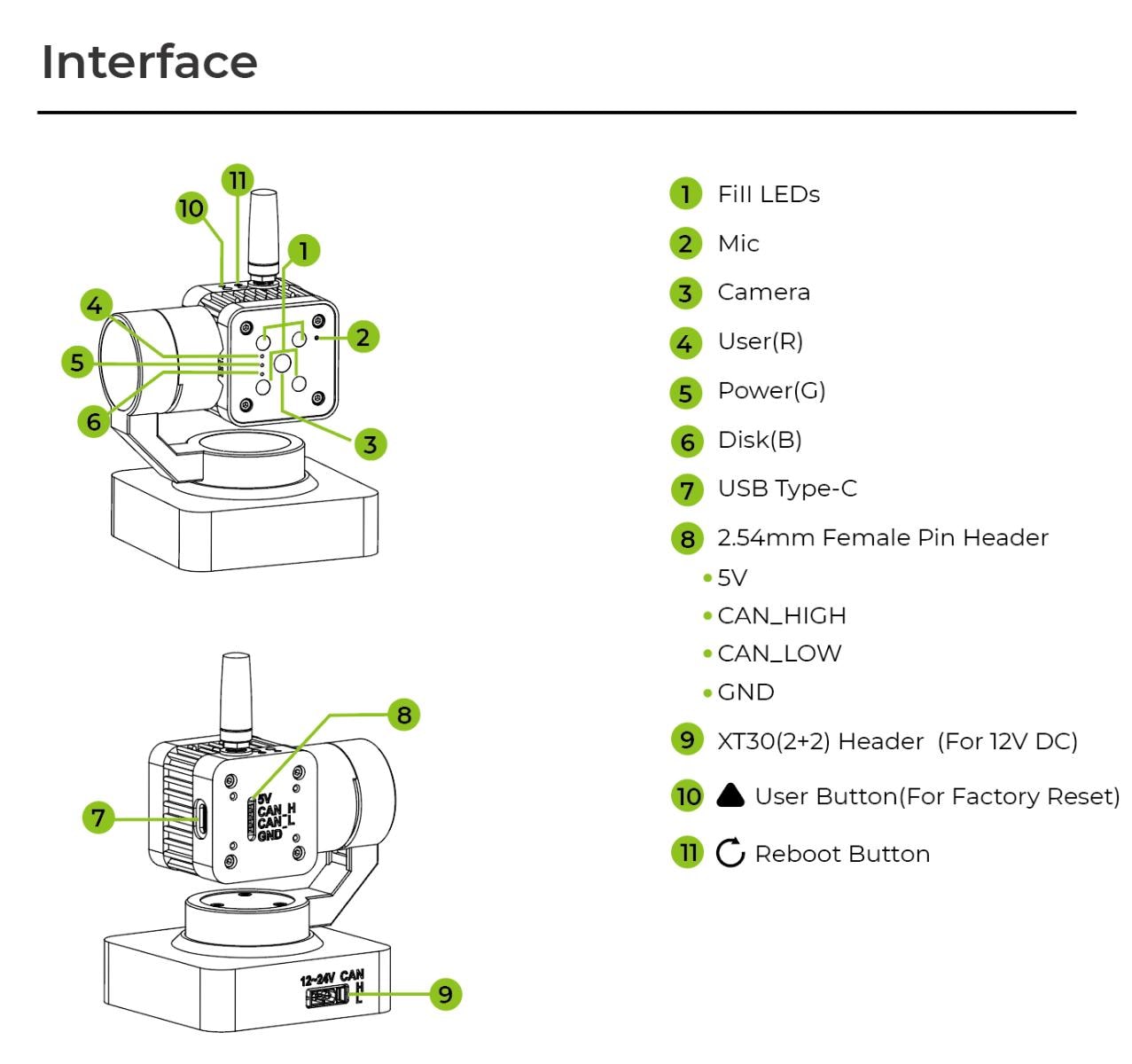
Source อธิบาย reCamera Gimbal 2002w ว่าเป็น Dual-axis Motorized Camera ที่ขับด้วย Brushless Motors และรองรับการส่ง Video / Data ผ่าน Protocol หลายแบบ รวมถึง RTSP และ MQTT
สำหรับ Project นี้ หน้าที่หลักมีสองส่วน:
- ส่ง Video Stream 1280 × 720 ที่ 30 fps ผ่าน RTSP
- รับ Yaw / Pitch Command ผ่าน MQTT Topic
cmd
Tracking Script จำกัด Yaw ไว้ที่ 30–330° และ Pitch ที่ 10–120° เพื่อควบคุมขอบเขตการทำงานของระบบ
QIM SDK เปลี่ยน AI ให้เป็น GStreamer Element ได้อย่างไร?
หลังติดตั้ง Qualcomm-specific GStreamer Plugins ผู้สร้างตรวจ Element ด้วยคำสั่ง gst-inspect-1.0 และพบ Plugin หลายกลุ่ม ทั้ง AI, Video, Object Tracking และ Messaging
| Plugin ตัวอย่าง | หน้าที่ |
|---|---|
| qtimlqnn | QNN-based Machine Learning |
| qtimltflite | TFLite Machine Learning |
| qtimlvdetection | Image Object Detection |
| qtiobjtracker | Object Tracker |
| qtivoverlay | Video Overlay |
| qtimsgpub | Message Publisher |
| qtimsgsub | Message Subscriber |
| qtirtspbin | RTSP Streaming |
Application จึงสามารถต่อ Decode → Resize → AI → Overlay → Output เป็น GStreamer Graph แทนการเขียนแต่ละขั้นแยกจากกัน
Setup Ubuntu 24.04 และ QIM SDK บน IQ-9075
ผู้สร้างใช้ Qualcomm Launcher เพื่อ Flash Ubuntu 24.04 ลงบน IQ-9075 EVK และตั้ง Network / SSH ก่อนติดตั้ง QIM SDK Components
sudo apt update
sudo add-apt-repository ppa:ubuntu-qcom-iot/qcom-ppasudo apt install -y gstreamer1.0-tools gstreamer1.0-plugins-good \
gstreamer1.0-plugins-base gstreamer1.0-libavsudo apt install -y gstreamer1.0-plugins-qcomsudo apt install -y tensorflow-lite-qcom-apps libqnn-dev libsnpe-devgst-inspect-1.0 | grep qtiSetup reCamera และ Node-RED
reCamera มาพร้อม Operating System และ Node-RED Dashboard ที่เข้าผ่าน IP Address ของอุปกรณ์
ผู้สร้างเปลี่ยน reCamera จาก Default Access Point Mode ให้ Join Network เดียวกับ IQ-9075 ผ่าน Network Settings ใน Dashboard
จากนั้น Default Node-RED Flow ถูกแทนด้วย Flow สำหรับ Project นี้ ซึ่งจัดการ:
- LED Initialization ตอน Startup
- Camera Capture 1280 × 720 @ 30 fps
- RTSP Stream
- MQTT Subscription ที่ Topic
cmd - Validation ก่อน Motor Command
- Set Motors Pitch / Yaw
- LED Pulse 250 ms เมื่อรับ Command ที่ผ่าน Validation
แต่ไม่ควรเติมเงื่อนไข Validation เพิ่มเอง หากไม่ได้อ้าง Code ของ Function Node โดยตรง
เก็บ Dataset 1,222 ภาพด้วย Edge Impulse
ผู้สร้างสร้าง Edge Impulse Project และใช้ Laptop Camera ผ่านเมนู Connect to your computer เพื่อเก็บภาพมือ
Dataset รวม 1,222 Images จากระยะและ Lighting Conditions ที่แตกต่างกัน ก่อน Label ผ่าน Labeling Queue
Source ระบุจำนวน Dataset แต่ไม่ได้ให้ข้อมูลเพียงพอที่จะสรุปว่า Dataset นี้ครอบคลุมทุก Environment หรือพร้อมสำหรับ Production Deployment
Train Hand Detection ด้วย YOLO-Pro
Impulse ของ Project ใช้:
| Setting | ค่าที่ Source ระบุ |
|---|---|
| Input Size | 320 × 320 |
| Color Depth | RGB |
| Task | Object Detection |
| Model | YOLO-Pro |
| Augmentation | Basic Spatial + Color-space Augmentation |
Source ไม่ได้ระบุ Numeric Training Metric ที่เพียงพอสำหรับนำมา Claim Precision, Recall, mAP หรือ Real-world Detection Accuracy ในบทความนี้
Deploy Model เป็น Qualcomm IM SDK QNN Plugin
หลัง Train เสร็จ ผู้สร้างเลือก Deployment Target เป็น:
และเลือก Optimization: Quantized INT8
Build Artifact ประกอบด้วย Shared Library และ config.json ซึ่งถูก Unpack ลงใน Application Directory บน IQ-9075
จุดสำคัญคือ Edge Impulse Model ถูกนำมาใช้งานในรูปของ GStreamer Plugin ไม่ใช่ Python Model API แยกต่างหาก
GStreamer Pipeline: RTSP → Decode → AI → Overlay
Video จาก reCamera เริ่มที่ 1280 × 720 จากนั้น Pipeline จะ Crop ด้านซ้ายและขวา เพื่อให้เหลือ Square ก่อน Resize เป็น 320 × 320 สำหรับ Model
↓
Hardware Decode
↓
1280 × 720 NV12
↓
Crop เป็น 720 × 720
↓
Resize 320 × 320
↓
RGB
↓
Edge Impulse Inference
↓
Overlay
↓
JPEG Appsink
rtph264depay ! h264parse ! v4l2h264dec !
video/x-raw,format=NV12,width=1280,height=720 !
videocrop left=280 right=280 top=0 bottom=0 !
videoscale !
video/x-raw,format=NV12,width=320,height=320 !
videoconvert !
video/x-raw,format=RGB !
edgeimpulsevideoinfer_820595-hands threshold="40.minScore=0.5 debug=true" !
edgeimpulseoverlay_820595-hands show-labels=false !
videoconvert !
jpegenc quality=80 !
appsink name=jpegsink emit-signals=true sync=false max-buffers=1 drop=trueระบบเลือก Target อย่างไรเมื่อมีหลายมือ?
Inference Result ถูกส่งออกมาเป็น Structured Message บน GStreamer Bus จึงไม่ต้อง Parse Raw Tensor Buffer ด้วยตัวเอง
Python Tracker จะ Filter Detection ก่อนเลือก Target
| สถานการณ์ | วิธีเลือก Target |
|---|---|
| ยังไม่มี Target ก่อนหน้า | เลือก Detection ที่ Confidence สูงสุด |
| มีตำแหน่ง Target ก่อนหน้าแล้ว | เลือก Detection ที่ใกล้ตำแหน่งเดิมที่สุด |
| มี Locked Label | พยายามใช้ Detection ที่เป็น Label เดิมก่อน |
def pick_target(detections):
    if not detections:
        return None

    if state["smoothed_cx"] is not None:
        candidates = detections

        if state["locked_label"] is not None:
            same_label = [
                d for d in detections
                if d.label == state["locked_label"]
            ]

            if same_label:
                candidates = same_label

        def dist(d):
            return (
                (d.cx - state["smoothed_cx"]) ** 2
                + (d.cy - state["smoothed_cy"]) ** 2
            )

        return min(candidates, key=dist)

return max(detections, key=lambda d: d.confidence)ผู้สร้างระบุเองว่า Future Work อาจใช้ Object-tracking Field จาก Edge Impulse Output สำหรับ Persistent Multi-target Tracking
EMA + Dead Zone + PID เปลี่ยน Detection ให้เป็น Gimbal Motion
Bounding Box Center ไม่ได้ถูกส่งเข้า PID ทันที
Source ใช้ Exponential Moving Average เพื่อ Smooth ตำแหน่งก่อน:
| Parameter | Current Script |
|---|---|
| EMA Alpha | 0.15 |
| Dead Zone | 4 px |
| Yaw Kp | 0.35 |
| Yaw Ki | 0.0 |
| Yaw Kd | 0.15 |
| Pitch Kp | 0.35 |
| Pitch Ki | 0.0 |
| Pitch Kd | 0.15 |
| Max Delta ต่อ Update | 4° |
| Command Rate | ประมาณ 6 ครั้ง/วินาที |
แม้ Source เรียก Controller ว่า PID แต่ Gain ชุดปัจจุบันไม่มี Integral Term จึงมีพฤติกรรมในลักษณะ PD Controller
หลัง Smooth แล้ว ระบบคำนวณ Offset จาก Center ของ Frame และใช้ Camera FOV ใน Script แปลง Pixel Error เป็น Angular Error ก่อนส่งเข้า Controller
ไม่ควรนำไปใช้กับ Camera หรือ Lens คนละชุด โดยไม่ตรวจ Specification และ Calibration ใหม่
ส่ง Yaw / Pitch กลับไป reCamera ผ่าน MQTT
หลัง PID คำนวณ Delta Tracking Script จะ Update Yaw และ Pitch แต่ยัง Clamp ให้อยู่ภายในขอบเขต:
- Yaw: 30–330°
- Pitch: 10–120°
จากนั้น Command ถูก Publish ไปยัง MQTT Topic: cmd
Node-RED ฝั่ง reCamera จะรับ Message, ผ่าน Validation Function และส่งค่าไปยัง Motor Node เพื่อขยับ Gimbal จริง
Source Code ใช้ IP ของ reCamera ใน Setup ของผู้สร้าง ผู้ทำตามต้องเปลี่ยน Configuration ให้ตรงกับ IP Address และ Network ของตัวเอง
Detection Threshold มีสองชั้น
Source มี Threshold อยู่ทั้งใน GStreamer Inference Element และ Python Tracking Logic
| Layer | Threshold |
|---|---|
| Edge Impulse GStreamer Element | minScore = 0.5 |
| Python Tracker | Confidence ≥ 70% |
ดังนั้นการพูดว่า “ระบบใช้ Confidence 50%” อย่างเดียว จะไม่ครบ เพราะ Detection ที่ผ่าน Plugin ยังถูก Filter ซ้ำอีกครั้ง ก่อนเข้าสู่ Tracking Logic
ดู Annotated Detection ผ่าน MJPEG Stream
นอกจากควบคุม Gimbal Python Application ยังเก็บ JPEG Frame ล่าสุด จาก GStreamer Appsink และเปิด HTTP Server สำหรับดูผล Detection ผ่าน Browser
Source ใช้:
- HTTP Server Port 8080
- MJPEG Output
- Loop ส่งภาพประมาณ 15 fps
ส่วนนี้ช่วย Debug ว่า Model กำลัง Detect Target ตรงตำแหน่งใด โดยไม่ต้องเปิด Video Tool แยกบน IQ-9075
Current Build ยังมี Oscillation และต้อง Tune PID ต่อ
แม้ Pipeline สามารถ Tracking มือได้จริง แต่ผู้สร้างระบุใน Live Demo ว่ายังเห็น Oscillation บางส่วนใน Frame
นั่นหมายความว่า ค่า PID ปัจจุบันเป็น ค่าที่ใช้กับ Prototype นี้ ไม่ใช่ค่ามาตรฐาน ที่ควร Copy ไปใช้กับทุก Gimbal Setup
ระวัง Cable, Obstacle และ Mechanical Limit รอบ Gimbal ก่อนทดลอง Gain หรือ Angle Range ใหม่ และอย่าขยายขอบเขต Motion จากค่าใน Source โดยไม่มีเหตุผลด้าน Hardware รองรับ
Target Lost
ถ้าไม่พบ Target นานกว่า 1 วินาที Source Code จะ Reset PID State
แต่ Source ไม่ได้ระบุว่า Gimbal ต้องกลับ Center, เริ่ม Search Pattern หรือขยับไปตำแหน่งอื่น ดังนั้นบทความนี้จะไม่เติม Behavior เหล่านั้น
ดู reCamera Gimbal Tracking ทำงานจริง
โปรเจกต์นี้มีหลายขั้น แนะนำอ่านต้นฉบับควบคู่กัน
Project นี้รวมทั้ง Qualcomm Platform Setup, GStreamer, Edge Impulse, Node-RED, MQTT และ Control Loop จึงควรเปิด Main Tutorial และ Official Documentation ควบคู่ระหว่าง Build
Hackster Project
Main Build Guide พร้อม Pipeline, Code และขั้นตอน Train Model
อ่าน Tutorial ฉบับเต็มจาก HacksterQualcomm Dragonwing IQ-9075
Official Product และ Development Information
เปิด IQ-9075 EVK DocumentationQualcomm Intelligent Multimedia SDK
Official Framework สำหรับ Multimedia และ Edge AI Pipeline
อ่าน Qualcomm IM SDKreCamera Gimbal Documentation
Assembly, Network และ Hardware Setup จาก Seeed Studio
อ่าน reCamera Gimbal Getting StartedEdge Impulse Studio
ใช้สำหรับ Dataset, Training และ Build Qualcomm Deployment Artifact
เปิด Edge Impulse StudioFolder ที่เห็นใน Build เป็น Artifact ที่เกิดจาก Edge Impulse Deployment ของผู้สร้าง จึงไม่ควรสร้างปุ่ม Download หรือ URL สำหรับ Bundle นั้นขึ้นเอง
สิ่งที่ Maker เรียนรู้จาก Project นี้
AI Inference สามารถเป็น Element หนึ่งใน Multimedia Graph แทนการแยกเป็น Application คนละชุด
ต้องมี Target Association, Smoothing, Dead Zone และ Control Loop ก่อนจะขยับ Gimbal ได้ดี
RTSP ส่ง Video ส่วน MQTT ส่ง Actuation Command ทำให้ Processing และ Motor Hardware อยู่คนละ Device ได้
ค่า Gain ที่ใช้งานได้ ยังอาจเกิด Oscillation และต้องปรับตาม Mechanics, Delay และ Target Motion
FAQ — reCamera Gimbal Tracking กับ IQ-9075
1. Project นี้ใช้บอร์ดอะไรประมวลผล AI?
ใช้ Qualcomm Dragonwing IQ-9075 EVK สำหรับ Edge AI และ Tracking Logic
2. กล้องที่ใช้คือรุ่นอะไร?
Source ใช้ Seeed Studio reCamera Gimbal 2002w
3. Video ส่งจาก reCamera ไป IQ-9075 อย่างไร?
Project ใช้ RTSP Stream
4. Motor Command ส่งกลับไป reCamera อย่างไร?
ใช้ MQTT โดย Tracking Script Publish Yaw และ Pitch ไปที่ Topic cmd
5. Model Train ด้วยอะไร?
ใช้ Edge Impulse Studio และเลือก YOLO-Pro สำหรับ Object Detection
6. Dataset มีกี่ภาพ?
Source ระบุ 1,222 Images
7. Model Input ขนาดเท่าไร?
320 × 320 RGB
8. Model รันบน CPU หรือ NPU?
Project Deploy เป็น Qualcomm IM SDK GStreamer Plugin แบบ QNN เพื่อใช้ Hardware-accelerated Inference บน IQ-9075
9. Model ใช้ INT8 หรือไม่?
ใช่ Source เลือก Quantized INT8 ตอน Deployment
10. Input Video Resolution เท่าไร?
Node-RED ฝั่ง reCamera ใช้ 1280 × 720 ที่ 30 fps ใน Project นี้
11. Tracker ใช้ Confidence Threshold เท่าไร?
GStreamer Inference Element ใช้ minScore 0.5 และ Python Tracker มี Filter เพิ่มที่ 70%
12. PID Gain เท่าไร?
Current Script ใช้ Kp 0.35, Ki 0 และ Kd 0.15 ทั้ง Yaw และ Pitch
13. ทำไมเรียก PID ทั้งที่ Ki เป็น 0?
Code ใช้ PID Controller Class แต่ Current Gain ปิด Integral Term จึงมีพฤติกรรมในลักษณะ PD
14. Motor Command ส่งกี่ครั้งต่อวินาที?
Source Code กำหนด Publish Interval เป็น 1/6 วินาที หรือประมาณ 6 ครั้งต่อวินาที
15. ถ้าหามือไม่เจอ ระบบทำอะไร?
ถ้า Target หายเกิน 1 วินาที Script จะ Reset PID State แต่ Source ไม่ได้ระบุ Search Motion หรือ Return-to-center
16. ดู Detection Result ผ่าน Browser ได้หรือไม่?
ได้ Python Application เปิด Annotated MJPEG Stream ผ่าน HTTP Server บน Port 8080
17. Tracking ลื่นสมบูรณ์แล้วหรือไม่?
ยังไม่สมบูรณ์ ผู้สร้างระบุว่ายังเห็น Oscillation และ PID Gain ต้อง Tune เพิ่ม
18. Source ระบุ End-to-end Latency หรือไม่?
Source ไม่ได้ระบุ Numeric End-to-end Latency
19. Source ระบุ mAP หรือ Detection Accuracy หรือไม่?
Source ที่ใช้ในบทความนี้ไม่ได้ให้ Numeric Metric ที่เพียงพอสำหรับ Claim ค่าเหล่านี้
20. มี Public GitHub Repository ของ Project นี้หรือไม่?
จาก Source ที่ตรวจในรอบนี้ยังไม่พบ Public GitHub Repository ที่ยืนยันได้สำหรับ Project นี้
สรุป: จุดเด่นของ Project นี้คือการต่อ AI เข้ากับ Control Loop โดยไม่ทำระบบให้แตกเป็นหลายชิ้น
reCamera Gimbal Tracking Project ไม่ได้โดดเด่นเพียงเพราะใช้ NPU หรือ YOLO-Pro
สิ่งที่น่าสนใจกว่าคือ การนำ RTSP, Hardware Decode, Edge Impulse Inference, GStreamer Bus, Target Selection, PID และ MQTT มาเชื่อมกันเป็น Pipeline ที่แต่ละ Layer มีหน้าที่ชัด
reCamera รับผิดชอบ Camera และ Gimbal ขณะที่ IQ-9075 รับผิดชอบ AI และ Control Logic ทำให้ผู้สร้างสามารถพัฒนา Computer Vision กับ Physical Camera Motion แยกกันได้ โดยใช้ Network Protocol เป็นตัวเชื่อม
อย่างไรก็ตาม Source ยังยอมรับตรง ๆ ว่า PID Tuning ยังมี Oscillation จึงควรมอง Build นี้เป็น Working Prototype และ Reference Architecture มากกว่าค่าตั้งสำเร็จรูป ที่ Copy ไปใช้กับ Hardware ทุกชุดได้ทันที
References / แหล่งข้อมูลต้นฉบับ
กำลังทำ Computer Vision หรือ Edge AI Project?
Project แบบนี้ต้องประสานทั้ง AI Model, Development Board, Camera, Network และ Control Logic ให้ทำงานร่วมกัน
หากกำลังพัฒนา Computer Vision, AI Camera, Edge AI หรือ Embedded Project สามารถสอบถามทีม GlobalByte เรื่องบอร์ดหรืออุปกรณ์ ที่เหมาะกับ Requirement ของงานได้
บทความนี้เป็นการสรุปและเรียบเรียงจากแหล่งข้อมูลภาษาอังกฤษ อาจมีความคลาดเคลื่อน กรุณาตรวจสอบ Source ต้นฉบับก่อนลงมือทำ
ค่า PID, EMA, Dead Zone, Motor Range, Confidence Threshold และ Command Rate ที่กล่าวถึงเป็นค่าจาก Prototype ของผู้สร้าง ไม่ใช่ค่ามาตรฐานสำหรับ reCamera หรือ Gimbal ทุกชุด
ผู้สร้างระบุว่า Current Build ยังมี Oscillation และ PID Gain ยังต้อง Tune เพิ่ม จึงไม่ควรตีความว่าเป็น Production-ready Stabilized Tracking
Source ไม่ได้ระบุ Numeric End-to-end Latency, Inference Latency, Detection FPS, Tracking Accuracy, Precision, Recall หรือ mAP ที่เพียงพอสำหรับสร้าง Benchmark เพิ่มเติม
ค่า IP Address, Network Configuration และ RTSP / MQTT Endpoint ใน Source Code เป็นค่าของ Setup ผู้สร้าง ต้องเปลี่ยนให้ตรงกับ Network จริงของแต่ละระบบ
Gimbal เป็นอุปกรณ์ที่มี Motor และชิ้นส่วนเคลื่อนที่ ควรตรวจ Mechanical Clearance, สายไฟ และสิ่งกีดขวาง ก่อน Run Tracking หรือปรับ Angle Limit
Source ไม่ได้ระบุ Motor Torque, Maximum Tracking Speed, Maximum Payload, Power Consumption หรือ Long-term Reliability ของระบบ Tracking นี้
Edge Impulse Model Bundle ที่ผู้สร้าง Build สำหรับ QNN ไม่ได้มี Public Download Link ที่ยืนยันได้ใน Source ที่ตรวจ จึงควร Build Artifact จาก Edge Impulse Project ตาม Workflow ต้นฉบับ แทนการใช้ไฟล์จากแหล่งที่ไม่ยืนยัน
Software Package, Qualcomm SDK, Ubuntu Package, Edge Impulse Deployment Target และ reCamera Firmware สามารถเปลี่ยนตาม Version ได้ ควรตรวจ Official Documentation ล่าสุด ก่อนติดตั้งหรือ Compile


