
SecurePair คืออะไร? ESP32 จับคู่และเข้ารหัสผ่าน LED ดวงเดียว
LED ดวงเดียวทำอะไรได้บ้าง? นอกจากใช้เป็นไฟแสดงสถานะ Project นี้ทำให้ LED ธรรมดาบน ESP32 เป็นทั้งตัวส่งแสง ตัวรับแสง ช่องทางแลก Key และหน้าจอแบบง่าย ๆ สำหรับยืนยันว่า Device สองตัวกำลัง Pair กับคู่ที่ถูกต้อง
Library ที่อยู่เบื้องหลังมีชื่อว่า SecurePair โดยใช้ PacketLED เป็น Optical Data Link สำหรับส่งข้อมูลผ่าน LED จากนั้น SecurePair จัดการเรื่อง Key Agreement, Human Verification, Encryption, Authentication และ Replay Protection
ที่น่าสนใจยิ่งกว่าคือ LED ไม่จำเป็นต้องเป็นช่องทางสื่อสารตลอดเวลา เพราะเราสามารถ Pair Device ผ่านแสงก่อน แล้วเปลี่ยนไปส่งข้อมูลจริงผ่าน ESP-NOW หรือ Transport อื่นที่รองรับได้
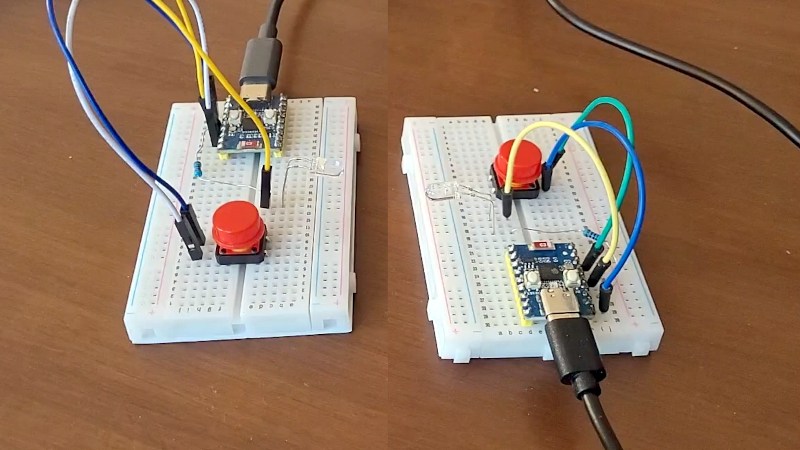
- SecurePair และ PacketLED เป็นคนละ Layer: PacketLED ทำ Optical Link ส่วน SecurePair ทำ Pairing และ Security
- LED ธรรมดาดวงเดียวต่อบอร์ดสามารถใช้ทั้งส่งแสงและตรวจจับแสงได้
- SecurePair 0.5.0 อยู่ในสถานะ Beta
- ใช้ X25519, SHA-256, HMAC-SHA256, HKDF-SHA256 และ AES-256-GCM
- Pairing ใช้ 20-bit Short Authentication String ที่ผู้ใช้ตรวจจาก Pattern การกระพริบ
- Pair ผ่าน LED แล้วสามารถเปลี่ยนไปส่งข้อความเข้ารหัสผ่าน ESP-NOW ได้
- รองรับหลาย Peer โดยค่าเริ่มต้นสูงสุด 8 Peer และปรับได้ถึง 16 ตาม Source
- PacketLED รองรับ 256, 512 และ 1024 bit/s
- Clear narrow-beam LED ถูกทดสอบถึง 2.5 เมตรที่ 1024 bit/s ใน PacketLED แต่ระยะขึ้นกับ LED และเงื่อนไขจริงมาก
- SecurePair Protocol ยังไม่ได้รับ Independent Cryptographic Review
SecurePair คืออะไร?
SecurePair เป็น Arduino Library สำหรับสร้างความสัมพันธ์ระหว่าง ESP32 เพื่อให้ Device สามารถตกลง Key ใหม่ระหว่างกัน แล้วใช้ Key นั้นสำหรับส่งข้อความ ที่ถูกเข้ารหัสและตรวจสอบความถูกต้อง
Pain Point ที่ Project นี้พยายามแก้คือ: ถ้า Device ไม่มีหน้าจอ ไม่มี Keyboard และไม่อยากฝัง Shared Password เดียวกันลง Firmware ทุกเครื่อง เราจะทำให้สอง Device รู้จักกันอย่างปลอดภัยได้อย่างไร?
SecurePair เลือกใช้ LED และปุ่มกด เป็น Human Interface ขั้นต่ำ โดยไม่ต้องมี App, QR Code, Keyboard หรือ Password สำหรับการ Pairing
ก่อนอื่นต้องแยก SecurePair กับ PacketLED ออกจากกัน
จุดนี้สำคัญมาก เพราะถ้าอ่านเฉพาะ Headline อาจเข้าใจว่า SecurePair คือ Library สำหรับสื่อสารผ่าน LED อย่างเดียว
| Layer | หน้าที่ |
|---|---|
| PacketLED | ทำ Data Link ผ่าน LED: ส่ง รับ Packet, CRC, ACK, Retransmission และ Duplicate Filtering |
| SecurePair | ทำ Key Agreement, Human Confirmation, Encryption, Authentication, Key Storage และ Replay Protection |
Pairing / Keys / Encryption
↓
Transport
PacketLED / ESP-NOW / LoRa
ข้อดีของ Architecture แบบนี้คือ Pairing Transport กับ Message Transport ไม่จำเป็นต้องเป็นตัวเดียวกัน
LED ดวงเดียวส่งและรับข้อมูลได้ยังไง?
เวลาใช้งานตามปกติ LED เปลี่ยนกระแสไฟฟ้าเป็นแสง
แต่ Junction ภายใน LED สามารถตอบสนองต่อแสงที่ตกกระทบได้เช่นกัน ทำให้ LED ถูกใช้เป็น Light Sensor แบบง่าย ๆ ได้
PacketLED ใช้หลักการนี้โดย:
ดังนั้น Hardware ตัวเดียวกัน สามารถสลับ Role ระหว่าง:
- Emitter — เปิด LED เพื่อส่ง Bit
- Sensor — อ่าน Light Level เพื่อรับ Bit
Hardware และการต่อ LED ใช้อะไรบ้าง?
สำหรับ Optical Link PacketLED ระบุ Hardware ขั้นต่ำต่อ Board:
- ESP32 Board
- LED 1 ดวง
- Resistor 1 ตัว
ส่วน SecurePair Workflow ต้องมี Input สำหรับตอบ Yes / No ซึ่ง Example ใช้ Push Button
| จุดต่อ | ตาม PacketLED Source |
|---|---|
| LED Anode | ADC1-capable GPIO → Resistor → LED Anode |
| LED Cathode | Output-capable GPIO → LED Cathode |
| Classic ESP32 ที่ทดสอบ | GPIO32 / GPIO33 |
| ESP32-C3 ที่ทดสอบ | GPIO0 / GPIO1 |
Classic ESP32 GPIO34–39 เป็น Input-only จึงใช้กับ Physical Layer นี้ไม่ได้ตาม Source
ค่า Resistor ไม่ควรเลือกจากตัวอย่างเพียงอย่างเดียว เพราะต้องดู Forward Voltage ของ LED, กระแสที่ต้องการ และข้อจำกัดของ GPIO ด้วย
LX.25 ทำให้การกระพริบ LED กลายเป็น Packet Link ได้อย่างไร?
PacketLED ไม่ได้ส่งข้อมูลด้วยการ “เปิดไฟแทน 1 ปิดไฟแทน 0” แบบตรง ๆ เพียงอย่างเดียว
Library มี Link Protocol ชื่อว่า LX.25 ซึ่งได้แรงบันดาลใจจาก AX.25 Packet Radio
Packet หนึ่งรองรับ Payload:
และมี:
- CRC-16/X.25
- Acknowledgement
- Retransmission สูงสุดตาม Protocol
- Duplicate Filtering
- Listen-before-transmit
- Random Delay ก่อน Retry
Bit ถูก Manchester-coded:
- 0 = Light → Dark
- 1 = Dark → Light
Receiver จึงเปรียบเทียบ Light Level ของสองช่วงในแต่ละ Bit ช่วยลดผลกระทบจาก Ambient Light คงที่ และ Slow Flicker เช่นแสงจากระบบไฟฟ้า 50 Hz
ความเร็วและระยะของ PacketLED เท่าไร?
PacketLED รองรับ Bit Rate:
- 256 bit/s
- 512 bit/s
- 1024 bit/s
แต่ระยะไม่ได้มีตัวเลขเดียว เพราะขึ้นกับ LED, Beam Angle, Current, Ambient Light และการจัดแนว
| Setup ที่ Source ทดสอบ | ผลที่ Source รายงาน |
|---|---|
| 5 mm clear red LED, narrow beam, 100 Ω | ทดสอบถึง 2.5 m ที่ 1024 bit/s |
| Generic 3 mm diffused red LED, 470 Ω | ประมาณ 3 cm @ 1024 bit/s, 5 cm @ 512 bit/s, 8 cm @ 256 bit/s |
| Generic diffused LED, 100 Ω | ประมาณ 7–8 cm @ 1024 bit/s ตาม Source |
SecurePair เองระบุว่า Hardware Test ของ Optical Pairing ทำได้ถึงประมาณ 2 เมตร ภายใต้ Setup ที่ผู้สร้างทดลอง
ทำไม SecurePair เลือกใช้แสงตอน Pairing?
Radio สะดวก แต่มีคุณสมบัติหนึ่งที่ไม่เหมาะกับการ Pair Device ที่ต้องการ Physical Proximity: คนที่อยู่ในระยะ Radio ไม่จำเป็นต้องยืนอยู่ตรงหน้าเรา
แสงมี Boundary ทางกายภาพชัดกว่า:
- ต้องมี Line of Sight
- LED ต้องหันเข้าหากัน
- แสงไม่ทะลุกำแพงเหมือน Radio
- การเข้ามาแทรก Optical Path ทำได้ยากขึ้นในทางกายภาพ
สิ่งที่ใช้ตรวจว่ามี Device แทรกกลางการแลก Key หรือไม่ คือ Short Authentication String ที่ผู้ใช้ต้องเปรียบเทียบทั้งสองฝั่ง
Pairing จริง ผู้ใช้ต้องทำอะไรบ้าง?
SecurePair ออกแบบขั้นตอน ให้ Device ที่ไม่มีหน้าจอ ยังสามารถให้มนุษย์ยืนยัน Pairing ได้
↓
2. หัน LED เข้าหากัน
↓
3. แลก Key ผ่านแสง
↓
4. LED แสดง 20-step Code
↓
5. Pattern เหมือน → Confirm
↓
6. Save Peer Key
ถ้า Pattern ต่างกัน Source กำหนดให้ผู้ใช้ Reject แทนการบันทึก Key
การ Pair ใหม่ภายหลัง สามารถใช้เพื่อแทนที่ Key ของ Peer ที่รู้จักอยู่แล้วได้
20 Blink Code เอาไว้ป้องกันอะไร?
หลังการแลก Key SecurePair สร้าง Short Authentication String หรือ SAS ขนาด 20 bit
เมื่อใช้ Plain LED Code จะถูกแสดงเป็น:
Protocol ระบุแต่ละ Slot 500 ms ทำให้ Code Window รวมประมาณ 10 วินาที
ผู้สร้างระบุว่า Commitment Scheme ทำให้โอกาสที่ผู้โจมตีแบบ Man-in-the-Middle จะสร้าง SAS ให้ตรงทั้งสองฝั่งโดยบังเอิญอยู่ที่:
X25519, HKDF และ AES-256-GCM ทำหน้าที่ต่างกันยังไง?
SecurePair ไม่ได้สร้าง Encryption Algorithm ใหม่ขึ้นเอง แต่ประกอบ Protocol จาก Cryptographic Primitive มาตรฐานหลายตัว
| หน้าที่ | Algorithm |
|---|---|
| Key Agreement | X25519 |
| Hash / Commitment / Transcript | SHA-256 |
| Authentication ระหว่าง Pairing | HMAC-SHA256 |
| Key Derivation | HKDF-SHA256 |
| Message Encryption + Authentication | AES-256-GCM |
X25519 และ AES-GCM ใช้ Implementation จาก Mbed TLS ที่มากับ ESP32 Core ตาม Repository
ส่วน Message Direction แต่ละฝั่ง ได้ AES-GCM Key แยกจากกัน เพื่อหลีกเลี่ยงปัญหา การใช้ Nonce ซ้ำระหว่างสองทิศทาง
SecurePair 0.5.0 ยังเป็น Beta และผู้สร้างระบุเองว่า Protocol ยังไม่ผ่าน Independent Cryptographic Review
Pair ด้วย LED แล้วทำไมคุยต่อผ่าน ESP-NOW ได้?
SecurePair แยก Pairing Transport ออกจาก Message Transport
ตัวอย่างที่น่าสนใจที่สุดคือ:
↓
ตกลง Key + Human Confirm
↓
Save Key
↓
เปิด ESP-NOW
↓
ส่ง Encrypted Messages ผ่าน Radio
ดังนั้น LED สามารถทำหน้าที่ เหมือน Physical Provisioning Interface ที่ใช้เพียงตอนนำ Device มา Pair กัน
| Transport | Range ที่ Repository อธิบาย | SecurePair Message Size | สถานะ |
|---|---|---|---|
| PacketLED | ไม่กี่ cm ถึงประมาณ 2 m ขึ้นกับ LED | 35 bytes | Hardware-tested |
| ESP-NOW | ระดับหลายสิบเมตรตาม Repository | 217 bytes | Hardware-tested |
| LoRa | Repository อธิบายเป็นระดับ km | 216 bytes | ยังไม่ Hardware-tested ใน SecurePair 0.5.0 |
ทำไม PacketLED ส่งได้ 64 Bytes แต่ SecurePair เหลือ 35 Bytes?
PacketLED ดิบ รองรับ Payload สูงสุด 64 bytes
แต่ SecureLink ต้องเพิ่ม Security Metadata เข้าไปใน Frame:
| Field | ขนาด |
|---|---|
| Type | 1 byte |
| Key ID | 4 bytes |
| Epoch | 4 bytes |
| Counter | 4 bytes |
| AES-GCM Tag | 16 bytes |
รวม Fixed Overhead: 29 bytes
นี่เป็นตัวอย่างที่ดีว่า Encryption และ Authentication ไม่ได้เกิดขึ้นแบบ “ฟรี” แต่มี Protocol Overhead เพิ่มเข้ามา
Encrypted อย่างเดียวไม่พอ ทำไม SecurePair ต้องกัน Replay?
สมมติ Attacker อ่านเนื้อหาข้อความไม่ได้ แต่ Record Packet คำสั่ง “เปิดประตู” ไว้ได้
ถ้าระบบยอมรับ Packet เดิมซ้ำ Encryption อย่างเดียว ก็ไม่ได้แก้ปัญหานี้
SecurePair จึงใช้:
- Boot Epoch
- Message Counter
- Replay Window ต่อ Peer
- Challenge / Proof หลัง Receiver Reboot ในบางกรณี
Repository ระบุว่า Counter เดิมไม่ควรถูกใช้ซ้ำกับ Key เดิม เพราะ AES-GCM ต้องหลีกเลี่ยง Nonce Reuse
Board เดียว Pair ได้กี่อุปกรณ์?
Hackaday ระบุถูกต้องว่า Project ไม่ได้จำกัดอยู่แค่ ESP32 สองตัว
Current SecurePair README ให้ตัวเลขชัดกว่า:
และปรับได้ถึง 16 Peers ตาม Configuration
Peer แต่ละตัวมี Identity และ Key ของตัวเอง
ถ้า Pair กับ Device เดิมใหม่ SecurePair จะ Replace Key ของ Peer เดิม แทนการสร้าง Record ซ้ำอีกตัว
Key ถูกเก็บไว้ที่ไหน?
SecurePair ใช้ ESP32 NVS สำหรับเก็บ Peer Record และ Key เพื่อให้ข้อมูล Pairing อยู่ต่อหลัง Reset
แต่มี Caveat สำคัญ:
สำหรับ ESP32 Variant ที่มี HMAC Peripheral SecurePair รองรับการสร้าง Device-specific Chip Key แล้วใช้ Key นั้น ใน Workflow สำหรับ Seal Peer Records
Repository ระบุ HMAC-capable Chip สำหรับ Feature นี้ ได้แก่:
- ESP32-S2
- ESP32-S3
- ESP32-C3
- ESP32-C5
- ESP32-C6
- ESP32-H2
- ESP32-P4
SecurePair Documentation เตือนว่า Writing eFuses cannot be undone จึงไม่ควรทดลองกับ Board สำคัญ หากยังไม่เข้าใจ eFuse และ Security Configuration ของ ESP32 อย่างชัดเจน
AES-256 ไม่ได้แปลว่าทุก Attack ถูกปิดหมด — SecurePair มีข้อจำกัดอะไรบ้าง?
Repository เปิดเผย Known Limitations ค่อนข้างตรงไปตรงมา
ผู้ใช้ Confirm โดยไม่ดู Code
Human Verification เป็นส่วนหนึ่งของ Security Model ถ้าผู้ใช้กด Confirm โดยไม่ตรวจ Pattern การป้องกัน MITM จะอ่อนลง
ไม่มี Forward Secrecy สำหรับ Message History
SecurePair ระบุว่า Stored Message Key ไม่มี Forward Secrecy ดังนั้นถ้า Key ถูกอ่านได้ในภายหลัง ข้อความเก่าที่ถูก Record ไว้ อาจถูกถอดได้
Flash Rollback
Repository ระบุว่า การเขียน Flash Image เวอร์ชันเก่ากลับลงไป ยังไม่ถูก Detect และอาจทำให้ State บางส่วนย้อนกลับ
Attacker รัน Code บน Chip ได้
Chip-bound Storage ไม่ได้ป้องกัน Code ที่ผู้โจมตี สามารถรันบน MCU ตัวเดิมได้โดยอัตโนมัติ เพราะ Code บน Chip อาจเข้าถึง Hardware Security Peripheral ได้เช่นกัน
Randomness ตอน Radio Off
Repository ระบุว่า ขณะ Pairing ผ่าน LED Radio ถูกปิด และ esp_random() ไม่ใช่ Full-entropy Source ในเงื่อนไขนั้น
Library จึง Mix ESP32 Random, CPU Timing และ Noise จากการอ่าน LED ผ่าน SHA-256
Status Beta 0.5.0 สำคัญอย่างไร?
Current library.properties ที่ตรวจระบุ SecurePair:
Hardware ที่ Repository ระบุว่าทดสอบแล้ว:
- ESP32
- ESP32-C3
- ESP32-C6
มีการทดสอบ:
- Pairing ผ่าน LED
- Pairing ผ่าน ESP-NOW
- Message ผ่าน LED
- Message ผ่าน ESP-NOW
- Re-pairing
- Encrypted Storage
แต่:
Source Code Example: Pair ผ่าน LED แล้วคุยผ่าน ESP-NOW
จุดที่เห็น Architecture ของ SecurePair ได้ชัดที่สุดคือ Pairing Transport กับ Message Transport ถูกกำหนดแยกกัน
#include <PacketLED.h>
#include <SecurePairLed.h>
#include <transport/EspNowTransport.h>

ArduinoLedPhy phy(32, 33);
PacketLED led(phy);

PacketLedTransport optical(led);
EspNowTransport radio;

LedDisplay display(optical);
NvsPairStorage storage;

SecurePair pairing(optical, storage, display, display);
SecureLink channel(pairing, radio);
ในตัวอย่างนี้ optical ใช้สำหรับ Pairing ส่วน radio ใช้เป็น Transport ของ SecureLink หลังจากนั้น
void setup() {
  button.begin();
  led.begin();
  pairing.begin();
  pairing.provision(button);
  radio.begin();
  channel.sync();
}
ลำดับนี้มีความหมาย: SecurePair ทำ Optical Pairing ก่อน แล้วจึงเริ่ม ESP-NOW
Official README อธิบายว่า PacketLED ต้องการ Timing ระดับ Microsecond และ Wi-Fi Interrupt อาจรบกวน Optical Timing จึงเริ่ม Radio หลัง Pairing ใน Example นี้
ดู SecurePair จับคู่ ESP32 ผ่านแสงทำงานจริง
Video ของ Project แสดงแนวคิด LED-to-LED Pairing และการใช้ Pattern กระพริบ เพื่อให้ผู้ใช้ยืนยัน Device ทั้งสองฝั่ง
Project แบบไหนน่าเอาแนวคิด SecurePair ไปต่อ?
Sensor Node + Gateway
Pair Sensor กับ Gateway บนโต๊ะด้วย LED ก่อนนำ Node ไปติดตั้ง แล้วส่งข้อมูลผ่าน ESP-NOW หรือ Transport อื่นที่เหมาะกับระบบ
Device ที่ไม่มีหน้าจอหรือ Keyboard
Device ที่มีเพียง LED และ Button ก็ยังสร้าง Human-verifiable Pairing Flow ได้
Remote Control / Actuator
SecurePair README ยกตัวอย่าง Command สำหรับ Relay, Gate Opener หรือ Lock ที่ต้องการ Authentication และ Replay Protection
Service / Provisioning Interface
PacketLED ยังสามารถใช้ Indicator LED เดิมของ Product เป็น Optical Data Port สำหรับ Configuration หรือ Debug โดยไม่ต้องเพิ่ม Connector แยก
FAQ: SecurePair, PacketLED และ ESP32 Optical Pairing
1. SecurePair คืออะไร?
เป็น Arduino Library สำหรับ Pair ESP32, ตกลง Key และส่งข้อความที่เข้ารหัส ตรวจสอบความถูกต้อง และป้องกัน Replay ตาม Protocol ของ Project
2. SecurePair กับ PacketLED เป็น Library เดียวกันไหม?
ไม่ใช่ PacketLED เป็น Optical Packet Link ส่วน SecurePair เป็น Security / Pairing Layer ที่สามารถใช้ PacketLED เป็น Transport ได้
3. LED ธรรมดารับแสงได้จริงไหม?
ได้ PacketLED ใช้คุณสมบัติของ LED Junction ที่ตอบสนองต่อแสง และอ่านผลผ่าน ADC ของ ESP32
4. ต้องมี Photodiode แยกไหม?
ไม่ต้องสำหรับ PacketLED Setup ที่ Source อธิบาย เพราะ LED ดวงเดียวถูกใช้ทั้งส่งและรับ
5. PacketLED เร็วเท่าไร?
Current Source ระบุ 256, 512 และ 1024 bit/s
6. LED สื่อสารได้ไกลแค่ไหน?
ขึ้นกับ LED และ Setup PacketLED ทดสอบ Clear narrow-beam LED ถึง 2.5 m ที่ 1024 bit/s ขณะที่ Diffused LED ทั่วไป อาจอยู่เพียงระดับไม่กี่เซนติเมตร
7. SecurePair Pair ผ่าน LED ได้ไกล 2.5 เมตรไหม?
SecurePair README ระบุ Hardware Test ของ Pairing ผ่าน LED ถึงประมาณ 2 m ส่วน 2.5 m เป็นผลทดสอบ PacketLED ภายใต้ Setup เฉพาะ
8. ใช้ LED Pair อย่างเดียวแล้วส่งข้อมูลผ่าน ESP-NOW ได้ไหม?
ได้ นี่เป็น Example หลักของ SecurePair: Pair ผ่าน PacketLED แล้วใช้ ESP-NOW เป็น Message Transport
9. SecurePair ใช้ Encryption อะไร?
Current Source ระบุ X25519, SHA-256, HMAC-SHA256, HKDF-SHA256 และ AES-256-GCM ตามหน้าที่ต่าง ๆ ของ Protocol
10. 20 Blink Code มีไว้ทำอะไร?
เป็น Short Authentication String ที่ผู้ใช้เปรียบเทียบระหว่าง Device เพื่อช่วยตรวจการแทรกกลางระหว่าง Pairing
11. Board หนึ่ง Pair ได้กี่ Device?
SecurePair ระบุสูงสุด 8 Peer เป็นค่าเริ่มต้น และสามารถ Configure ได้ถึง 16
12. LoRa ใช้กับ SecurePair ได้ไหม?
มี LoRa Transport ใน Repository แต่ SecurePair 0.5.0 ระบุว่ายังไม่ได้ทดสอบบน Hardware
13. Key ถูกเก็บแบบเข้ารหัสเสมอไหม?
ไม่ Repository ระบุว่า ก่อน Device มี Chip Key NvsPairStorage เก็บ Pairing Keys แบบ Clear
14. Original ESP32 ใช้ Chip-key Storage แบบเดียวกันได้ไหม?
Repository ระบุว่า Original ESP32 ไม่มี HMAC Peripheral ที่ Feature นี้ต้องใช้ และแนะนำใช้ NVS / Flash Encryption ตาม ESP32 Security Workflow แทน
15. SecurePair ปลอดภัยแค่ไหน?
Project ใช้ Cryptographic Primitive มาตรฐานหลายตัว แต่ Library ยังเป็น Beta และ Protocol ยังไม่ได้ผ่าน Independent Cryptographic Review
16. SecurePair มี Forward Secrecy ไหม?
Repository ระบุว่าไม่มี สำหรับข้อความที่ใช้ Stored Message Key ดังนั้นถ้า Key ถูกอ่านได้ภายหลัง Recorded Messages เก่าอาจถูกถอดได้
17. ใช้กับ Arduino UNO หรือ ESP8266 ได้ไหม?
Source ปัจจุบันระบุ Architecture เป็น ESP32 และไม่ได้ระบุ Arduino UNO หรือ ESP8266 เป็น Platform ที่รองรับ
18. SecurePair ใช้ License อะไร?
SecurePair และ PacketLED ระบุ License เป็น Apache License 2.0 ใน Repository ปัจจุบัน
สรุป: ของที่น่าสนใจไม่ใช่แค่ “LED คุยกันได้” แต่คือการเอาแสงมาเป็น Pairing Channel
สิ่งที่ทำให้ SecurePair น่าสนใจกว่า Demo Optical Communication ทั่วไป คือการเอา Physical Property ของ LED มาผูกเข้ากับ Security Workflow จริง
PacketLED ทำให้ LED ดวงเดียว รับและส่ง Packet ได้
SecurePair นำ Link นั้น ไปใช้แลก Key แล้วให้คนยืนยัน Short Authentication String ก่อนบันทึก Peer
หลังจากนั้น Device ไม่จำเป็นต้องคุยผ่านแสงอีกต่อไป เพราะ Key เดิมสามารถนำไปใช้ กับ SecureLink บน ESP-NOW หรือ Transport อื่นได้
สำหรับ Maker นี่เป็น Project ที่เชื่อมหลายเรื่องเข้าด้วยกัน: Electronics, ADC, Optical Communication, Packet Protocol, ESP-NOW และ Applied Cryptography
เพียงต้องจำไว้ว่า SecurePair ยังอยู่ใน Beta และผู้สร้างเองก็ระบุว่า Protocol ยังต้องการ Independent Review ก่อนที่เราจะตีความว่า เหมาะกับระบบ Security-critical
โปรเจกต์นี้มีทั้ง Optical Link และ Security Protocol แนะนำอ่าน Source ต้นฉบับควบคู่กัน
ถ้าต้องการสร้าง Project จริง ควรอ่านทั้ง SecurePair และ PacketLED เพราะ SecurePair README เน้น Pairing / Encryption ส่วน PacketLED Documentation อธิบาย Physical Layer, Wiring, Timing และ Optical Link โดยละเอียดกว่า
อ่านบทความ Two Microcontrollers Talking, All It Needs Is An LED จาก Hackaday
ดู Source Code และ Documentation ของ SecurePair
อ่าน PacketLED Documentation และ Optical Link Details
อ่าน SecurePair Protocol Specification
อ่าน Security Notes และวิธีรายงาน Vulnerability
ดูวิดีโอ SecurePair: encrypted ESP32 links, paired through light
References / แหล่งข้อมูลต้นฉบับ
- Hackaday — Two Microcontrollers Talking, All It Needs Is An LED
- Luca Soltoggio / GitHub — SecurePair
- Luca Soltoggio / GitHub — PacketLED
- SecurePair — PROTOCOL.md
- SecurePair — SECURITY.md
- YouTube — SecurePair: encrypted ESP32 links, paired through light
อยากลองทำ Project ESP32, ESP-NOW หรือ IoT ของตัวเอง?
SecurePair เป็นตัวอย่างที่ดีว่า Project Electronics เล็ก ๆ สามารถเชื่อมทั้ง Hardware, Communication Protocol และ Security เข้าด้วยกันได้
หากกำลังทดลอง ESP32, ESP-NOW, LoRa, Sensor หรือ Development Board สามารถสอบถามทีม Globalbyte เรื่องบอร์ดและอุปกรณ์ ที่เหมาะกับ Architecture ของ Project ได้
SecurePair และ PacketLED เป็น Library คนละ Layer: PacketLED ทำ Optical Packet Communication ส่วน SecurePair ทำ Pairing, Key Agreement, Authentication, Encryption และ Replay Protection
Current SecurePair Release ที่ตรวจคือ Version 0.5.0 และ Repository ระบุสถานะเป็น Beta
SecurePair Protocol ใช้ Cryptographic Primitive มาตรฐาน เช่น X25519, SHA-256, HMAC-SHA256, HKDF-SHA256 และ AES-256-GCM แต่ Protocol โดยรวม ยังไม่ได้ผ่าน Independent Cryptographic Review จึงไม่ควรตีความว่าเป็นระบบที่ได้รับ Security Certification หรือรับประกันว่าไม่สามารถถูกโจมตีได้
Short Authentication String มีขนาด 20 bit และ Source ระบุ MITM Success Probability ภายใต้ Protocol Model ที่ประมาณ 2^-20 ต่อ Attempt แต่ Security ยังคงขึ้นกับ การที่ผู้ใช้ตรวจ Code จริง และไม่กด Confirm โดยไม่ดู
PacketLED Range 2.5 m ที่ 1024 bit/s เป็นผลทดสอบด้วย Clear narrow-beam red LED และ Setup ที่ผู้สร้างระบุ ไม่ใช่ Guarantee สำหรับ LED ทุกประเภท ขณะที่ SecurePair README ระบุ Hardware Test ของ Pairing ผ่าน LED ถึงประมาณ 2 m
PacketLED รองรับ Payload สูงสุด 64 bytes แต่ SecurePair over PacketLED ระบุ Application Message Size 35 bytes เนื่องจาก SecureLink มี Security Overhead 29 bytes
SecurePair ระบุ ESP32, ESP32-C3 และ ESP32-C6 เป็น Board ที่ Hardware-tested สำหรับ Workflow หลักที่กล่าวถึง Source ไม่ได้ยืนยันว่า ESP32 Variant ทุกตัวผ่าน Hardware Test ในระดับเดียวกัน
LoRa Transport มี Implementation ใน Repository แต่ SecurePair 0.5.0 ระบุว่ายังไม่ได้ทดลองกับ Hardware จริง
Pairing Keys ไม่ได้ถูก Encrypt at Rest โดยอัตโนมัติทุกกรณี Repository ระบุว่า NvsPairStorage เก็บ Key แบบ Clear จนกว่า Chip จะได้รับ Device-specific Key หรือใช้ Security Mechanism ที่เหมาะกับ ESP32 Variant นั้น
การเขียน Chip Key ลง ESP32 eFuse เป็นการเปลี่ยนแปลงแบบถาวร และ Source ระบุว่า Writing eFuses cannot be undone ควรอ่าน Official ESP32 Security Documentation ก่อนใช้กับ Hardware จริง
SecurePair ไม่มี Forward Secrecy สำหรับ Stored Message Key ตามข้อจำกัดที่ Repository ระบุ และ Flash Rollback เป็น Known Limitation อีกจุดหนึ่ง
ขณะ Pairing ผ่าน LED Repository ระบุว่า Radio ถูกปิด และ Randomness Source มีข้อจำกัดบางส่วน Library จึง Mix Noise จาก LED และ Timing เพิ่มเติม แต่ผู้สร้างระบุว่า คุณภาพของ Noise ดังกล่าว ยังไม่ได้ถูกวัด
ใช้การทดลองด้าน Encryption, ESP-NOW, LoRa และ Wireless Security เฉพาะกับ Hardware, Network, Credential และ System ที่คุณเป็นเจ้าของหรือได้รับอนุญาต


